UAE PASS Integration Guide for Apps and Websites
UAE PASS integration for apps and websites: who can apply, onboarding to go-live, the OAuth API, SOP levels and data, app-to-app login in Flutter, and pitfalls.
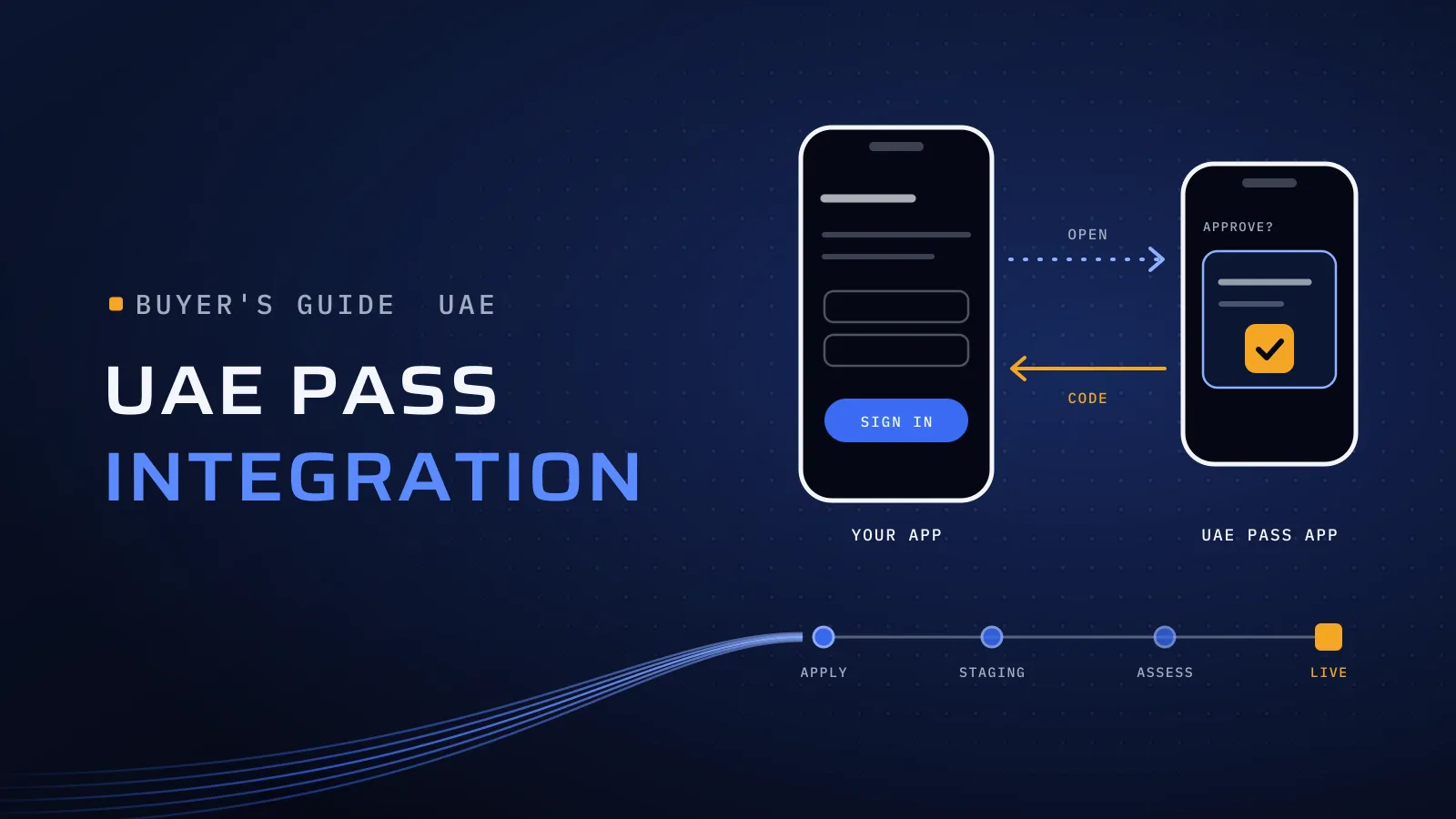
UAE PASS integration lets people sign in to your app or website with the UAE’s national digital identity, and sign documents with it if your service needs that. The code is a standard OAuth 2.0 login. The longer track is UAE PASS’s own approval: it reviews your use case and screens before you get credentials, and assesses your build before you go live.
What does a UAE PASS integration involve?
Quick answer: Government entities, and private companies with a valid UAE trade licence, apply on the UAE PASS developer portal. UAE PASS approves the use case, shares staging credentials, assesses your build in staging, then issues production credentials. Web login is the OAuth 2.0 authorization code flow: authorize, token, user info, logout. Mobile apps, Flutter included, run the same flow in a WebView and hand over to the UAE PASS app. What you receive depends on the account level: SOP1 is unverified and has no Emirates ID number. Link accounts on the UAE PASS UUID or the Emirates ID, never on email or mobile.
Planning UAE PASS sign-in? Get an estimate for your app or website →
Every rule below comes from the official UAE PASS documentation, which changes often, so confirm the details with your onboarding team.
Who can integrate UAE PASS, and for what?
UAE PASS is the national digital identity for citizens, residents and visitors, run under the Smart Government National Plan by Digital Dubai, TDRA and the Abu Dhabi Digital Authority. Each feature has its own questionnaire and assessment.
| Feature | What it does | Who can integrate it |
|---|---|---|
| Authentication | Sign in and sign up with UAE PASS | Government and private |
| Digital signature | A user signs one or several PDFs; with hash signing, only the document’s hash leaves your systems | Government and private |
| eSeal | Your organisation seals documents as the entity | Government and private |
| Data and document sharing | Users share documents from UAE PASS with their consent | Private only (government entities use GSB) |
| Web registration | People without UAE PASS create a basic (SOP1) account from your portal | Service providers |
| Facial biometric confirmation | A face check before a sensitive transaction | Special approval only |
Most apps and websites start with authentication and add signing or document sharing when a service needs it.
How does UAE PASS onboarding work?
The UAE PASS onboarding process has four phases, run by the onboarding team for the emirate you are registered in.
| Phase | What you do | What UAE PASS does |
|---|---|---|
| 1. Initiation | Request integration as Government or Private; send the trade licence (private), a questionnaire per feature, a user-journey diagram with its use case number, and wireframes | Approves the use case. A non-standard one needs management approval and takes longer |
| 2. Development | Build against staging, then ask for the assessment, using UAE PASS’s checklist | Shares staging credentials; starts a Service Provider Agreement (private) or an MoU (government) |
| 3. Assessment | Fix what it finds, record a video of every scenario, and sign the agreement (private) | Assesses, with a second round if needed; management approves go-live from the videos |
| 4. Go-live | Submit the go-live form, the production redirect URL and your date; build against production | Issues production credentials, assesses production, gives service desk access |
What this means for you: the approval track sets your launch date as much as the code does, and UAE PASS publishes no durations, so ask your onboarding team. Design the UAE PASS journeys before development, since they are reviewed first, and ask for the assessment when every checklist scenario works, not only the happy path.
SOP1, SOP2 and SOP3: who your users are, and what you receive
Each account has a level, returned as userType. It decides what the user can do and which attributes you receive.
| Level | Verification | Signing | Attributes you receive |
|---|---|---|---|
| SOP1 (basic) | Mobile and email by one-time code; Emirates ID not verified | None | UUID, user type, mobile, email, first and last name in English |
| SOP2 | Emirates ID, for example through SmartPass or an Emirates ID PIN | Advanced | Adds the Emirates ID number, full names in Arabic and English, nationality, gender, ID type and title |
| SOP3 | Emirates ID with finger or face biometrics | Qualified | Same as SOP2; also document sharing |
- Mark the levels each service accepts on your use case diagram, and show UAE PASS’s official message when a SOP1 user reaches a service that needs verification.
- Match your own login’s rules: if unverified users can use a service through your login, they must be able to through UAE PASS too.
- Visitors can hold verified profiles. Request the
profileTypeandunifiedIdscopes to identify them, and expect no Emirates ID number. - Date of birth and address are not in the published attribute list. If your service needs them, confirm with UAE PASS during onboarding.
How does the UAE PASS web login (API) work?
Authentication is the OAuth 2.0 authorization code flow, with endpoints under stg-id.uaepass.ae/idshub/ in staging and id.uaepass.ae/idshub/ in production.
- Authorize, in the browser: send the user to
/authorizewithresponse_type=code,client_id,redirect_uri,scope,state(UAE PASS recommends it against CSRF),acr_values, andui_locales=enorarfor the page language. - The user approves on their phone, after entering their Emirates ID, email or mobile. UAE PASS redirects to your
redirect_uriwith acodeand yourstate. - Token, server to server: post to
/tokenwithgrant_type=authorization_code, the sameredirect_uriand the code, using HTTP Basic authentication andContent-Type: multipart/form-data. The code is single-use and short-lived, so exchange it at once. Production access tokens last 3,600 seconds for every service provider. - User info, server to server: call
/userinfowithAuthorization: Bearer <token>. - Logout: when a user logs out of your service, also send them to
/logout, so the UAE PASS session ends too.
For a proof of concept before onboarding, the docs publish shared sandbox credentials that work only in staging.
How does UAE PASS mobile integration work?
On iOS and Android, the docs ask for the login inside an embedded WebView, not the phone’s browser, plus your own URI scheme so UAE PASS can hand control back.
- UAE PASS is on the phone: detect it (its Android package, or the
uaepass://scheme on iOS,uaepassstg://in staging) and load the login URL with the “mobile on device”acr_values. When the WebView reaches the UAE PASS deep link, save its success and failure URLs, rewrite both to your own scheme, and open the link to launch UAE PASS. After the user approves, UAE PASS opens your scheme; load the saved success URL in the same WebView, and the redirect brings the code. - UAE PASS is not installed: load the standard login URL in the WebView, and the user approves a notification on another device.
Token and user info then run on your server, as for the web. UAE PASS also publishes sample apps with SDKs for iOS and Android, covering both cases, the profile and document signing. Two warnings from the docs: never reuse the demo app’s scheme, and match the environment you call to the UAE PASS app installed, since staging and production are different apps.
How to integrate UAE PASS in a Flutter app
No Flutter package is listed in the UAE PASS docs, and the community packages on pub.dev are not published by UAE PASS. Build the documented mobile flow; Flutter only decides where each piece lives.
| Piece | In a Flutter app |
|---|---|
| Login screen | A WebView that can intercept each navigation (Flutter’s own webview_flutter plugin has a navigation delegate), not a browser tab |
| Is UAE PASS installed? | A platform check: the package on Android; on iOS, the uaepass and uaepassstg schemes declared in LSApplicationQueriesSchemes |
| Return to your app | Your scheme registered as an Android intent filter and an iOS URL type, then resume in the same WebView |
| Code to token | The app sends the code to your back end, which holds the client secret. The secret never ships in the app |
| Environments | Build flavours that switch the client ID, redirect URI, endpoints and UAE PASS scheme together |
| Language | ui_locales taken from the app’s language |
The other route wraps the official iOS and Android SDKs behind a platform channel: more native code, closer to UAE PASS’s samples. Either way, test on real phones with the staging app installed and without it, in Arabic and English. Our Flutter vs React Native comparison covers checking each SDK your app can’t launch without.
Planning UAE PASS in a new app or website? Send us the services that need it, who signs in (citizens, residents, visitors, staff of companies), whether you need signing, and the platforms. We reply with the use case we would design for, the screens it needs, and the team and price. Get an estimate for your app or website →
Not ready for a call? Ask for our company profile and we’ll send it to you.
Do you need UAE PASS digital signature or eSeal?
- Sign-in comes first: UAE PASS authentication is mandatory before a signing prompt, to confirm the signer is the logged-in user. SOP2 users sign at the advanced level, SOP3 at the qualified level, and SOP1 users can’t sign.
- Signing has its own token, obtained server to server with client credentials, separate from the login token.
- Hash signing keeps the document on your side: you send its hash, receive it signed, and embed the signature in the PDF.
- eSeal signs as your organisation, through a certificate process that differs for Dubai entities and other emirates. Formats are PAdES for PDF, CAdES for other files and XAdES for XML.
Account linking: the rules your build is assessed on
Most assessment findings are not in the OAuth calls but in what happens after login, when you match a UAE PASS user to your records. UAE PASS checks its standard implementation guidelines before approval, in staging and after go-live.
- Keep UAE PASS separate from your own login and registration flows.
- Match automatically only on unique, verified attributes, such as the Emirates ID number, then store the UUID and sign the user in by it. Users can change their UAE PASS email and mobile, so a link on either breaks and creates duplicate accounts.
- Link manually when nothing verified matches: the user enters their existing username and password, or answers security questions.
- Register new users without a password: prefill your form from UAE PASS, lock those fields, and never send backend credentials by email or SMS.
- Don’t link verified and unverified accounts to each other, in either direction.
- Release automatic linking, manual linking and new registration together.
- Let the user start the login, and use UAE PASS for the whole journey, not one step such as changing a phone number.
- Keep credentials to their channel: web and mobile each get their own.
UAE PASS identifies people, not companies. If people act for a company, your system decides after login who may, by mapping their UUID or Emirates ID to the company accounts they represent.
UAE PASS button and Arabic rules
UAE PASS publishes button guidelines and official assets in English and Arabic. Use them, not your own button.
- Style: white, outlined or black, picked for contrast. Text is black or white only; the logo keeps its green and red accents.
- Size: at least 140 × 30 pt, with a margin of a tenth of the height and the aspect ratio kept.
- Wording: “Sign in with UAE PASS” on sign-in and “Sign up with UAE PASS” on registration, never on the same page, and never “Login” mixed with “Sign in”. “Sign with UAE PASS” is for signing; “Continue with UAE PASS” is for document sharing, and must say documents are shared.
- “Powered by UAE PASS” or other logo use needs UAE PASS’s prior written consent or an agreement.
- Messages: UAE PASS publishes the English and Arabic text for each case, such as a cancelled login or an unverified account. Its Arabic calls UAE PASS «الهوية الرقمية».
For the rest of the Arabic interface, see our guide to Arabic app development and localization.
Before you apply: the UAE PASS preparation checklist
| Prepare | Why |
|---|---|
| Entity type, and a valid UAE trade licence for a private company | The onboarding team asks for it first |
| The features you need | Each has its own questionnaire |
| A workflow diagram with its use case number and the SOP levels you accept | UAE PASS’s standard scenarios: existing users (automatic or manual linking), existing plus new users, or new users only |
| Wireframes of every UAE PASS screen | Reviewed before approval; draw both languages if you serve both |
| Redirect URIs per environment | A development or staging URL first, production after assessment sign-off |
| Your own app URI scheme | For the hand-over back from UAE PASS |
| A back-end token endpoint and fields for the UUID and Emirates ID | The secret stays on the server; linking needs somewhere to store the link |
| Test phones with the staging UAE PASS app | Testers at each SOP level you accept |
| Your privacy policy | Not on UAE PASS’s public checklist: confirm during onboarding, and make sure it covers the identity data you store |
How to test UAE PASS in staging
- Install the staging UAE PASS app on test phones (on iOS, trust the “Dubai Smart Government” profile in settings). New accounts start as SOP1.
- Upgrade test accounts to SOP3 in the staging self-care portal, where a dummy Emirates ID number works; the app’s face and kiosk upgrades don’t work in staging. Don’t downgrade: delete the account and start again.
- Work from anywhere: staging accounts can be created from any location, and both environments’ APIs are reachable from overseas.
- Test every checklist scenario at each level: UAE PASS installed and not installed, a cancelled login, an unverified user, each kind of linking, logout, Arabic and English. Record each one on video for the assessment.
Our guide to quality assurance in software development explains why a tester separate from the developers catches these cases first.
Common UAE PASS integration pitfalls
| What you see | Usual cause | Fix |
|---|---|---|
| Callback URL or redirect mismatch | Different redirect URIs in the authorize and token calls, or an unregistered one | The exact registered URI in both calls |
| Invalid grant or expired code | The code was used late, or twice | Exchange it on the server at once, once |
| Server error on the token call | multipart/form-data header missing |
Send the header the docs specify |
| Invalid client or basic header | Client ID and secret not passed as configured | Base64 of client_id:client_secret in the Basic header |
| No return to your app, or another app opens | The demo scheme reused, or schemes don’t match | One unique scheme, used everywhere |
| Duplicate accounts | Linking on email or mobile | Link on the UUID or the Emirates ID |
| A blank Emirates ID | The user is SOP1 | Check userType first, show the official message |
| Still signed in to UAE PASS after logout | Only your session was cleared | Call the UAE PASS logout; clear WebView cookies on mobile |
| Signing request rejected | The login token or a wrong scope used for signing | A client-credentials token with the signing scope |
What drives the cost of a UAE PASS integration?
The build is priced by what your service needs. These move it most:
- Features: sign-in only, or signing, eSeal or document sharing too.
- Channels: a website, an iOS app and an Android app, each with its own credentials and assessment scenarios.
- Your users: existing users who need automatic and manual linking, new registrations, visitors, and people who act for companies.
- Your current login: adding UAE PASS beside a live identity system differs from a new build.
- Assessment rounds: each issue found means a fix and another round, so testing before the assessment matters.
The roles: a designer for the journeys UAE PASS reviews, a back-end developer for the token exchange and linking, a mobile developer for the WebView and deep links, and QA for every scenario and its recording. Our mobile app development cost guide shows how integrations add to an app’s team. On fees, UAE PASS’s FAQ says there are currently no charges for integrating, in an answer that also mentions a review planned for 2021; confirm the current position during onboarding.
Already holding a quote for an app with UAE PASS? Send us the proposal you received, with anything confidential removed. We reply with the questions to ask and what we would change. Send us the quote →
How Flojics plans UAE PASS into an app or website
We plan UAE PASS in from the first wireframe: the use case flow, the SOP levels each service accepts, the linking rules and the Arabic and English screens are designed before code, because UAE PASS reviews them before it shares staging credentials. As a mobile app development company in Dubai, we build in Flutter, React Native, Swift and Kotlin, with the back end and admin panel, and build portals through custom web development. Independent QA tests each scenario on real phones. For public-sector systems, see government software development.
Qargo is a car rental and ride-hailing platform in Qatar, with rider and driver apps and dashboards for admins and partners. Talk to the team that built it: book a meeting.
Plan the approval with the build
Since 2014 we have worked with more than 100 clients across the UAE, Saudi Arabia, Qatar, Kuwait, the USA and Canada. Our headquarters is at Dubai Digital Park, and our core team works from Egypt. Bring the services that need UAE PASS and the users who will sign in.
Get an estimate for your app or website → We ask about your goal, what you use today, your timing and who else should be involved. You leave with clear next steps. We reply by email first and set up a call only if you want one. Asking commits you to nothing, and we sign an NDA first if you ask.
Frequently asked questions
Can a private company integrate UAE PASS?
Yes. Private organisations can integrate authentication, digital signature and eSeal, and data and document sharing is open to private organisations only. You request integration on the UAE PASS developer portal as a private entity and send a valid UAE trade licence. UAE PASS approves your use case before it shares staging credentials, and a private entity signs a Service Provider Agreement before go-live.
Is there a fee to integrate UAE PASS?
UAE PASS's FAQ says there are currently no charges for integrating, in an answer that also mentions a review planned for 2021. Confirm the current position and the terms of your agreement during onboarding. The cost you control is the build: the features, the channels, the account-linking cases and the screens your service needs.
What is the difference between SOP1, SOP2 and SOP3?
They are UAE PASS account levels. SOP1 is a basic account: mobile and email verified, Emirates ID not verified, so no Emirates ID number is shared and the user can't sign. SOP2 is verified, for example through SmartPass or an Emirates ID PIN, and signs at the advanced level. SOP3 is verified with finger or face biometrics and signs at the qualified level.
Is there an official UAE PASS SDK for Flutter?
No Flutter package is listed in the UAE PASS documentation. UAE PASS publishes sample apps with SDKs for iOS and Android. A Flutter app either follows the documented mobile flow itself, with a WebView, its own URI scheme and the hand-over to the UAE PASS app, or wraps the iOS and Android SDKs behind a platform channel. Either way, the code-for-token exchange runs on your server.
Can we test UAE PASS before we are approved?
Yes, for a proof of concept. The documentation publishes shared sandbox credentials that work only in staging, and anyone can install the staging UAE PASS app and create a test account. Your own staging credentials come after UAE PASS approves your use case, and your build is assessed in staging before you get production credentials.
What user data does UAE PASS share?
Every account returns a UAE PASS UUID, the user type, a verified mobile and email, and the first and last name in English. Verified SOP2 and SOP3 accounts add the Emirates ID number, full names in Arabic and English, nationality, gender, ID type and title. Visitors never return an Emirates ID number. Date of birth and address are not in the published list, so confirm with UAE PASS if your service needs them.
Can a development team outside the UAE build the integration?
Yes. UAE PASS's FAQ says its staging and production APIs are reachable from overseas, and its docs say staging accounts can be created from any location. The request, the agreement and the credentials stay in your company's name.