Arabic App Development and Localization: Getting Right-to-Left Right
Arabic app development for UAE and GCC launches: mirrored layouts, icons, digits, mixed text, fonts and store listings, and what to ask a company.
Arabic app development decides whether Arabic-speaking users in the UAE and the GCC feel the app was made for them, or translated for them. Get right-to-left (RTL) design right and the Arabic version earns the same trust as the English one; get it wrong, with a back arrow pointing the wrong way, a scrambled phone number or a label cut off mid-word, and users notice before they reach the first feature. Choosing an Arabic app development company? The questions near the end of this guide show who has done it before.
What does Arabic app development involve?
Quick answer: Arabic app development is more than translation. The layout mirrors from right to left, directional icons flip while others stay, and you set rules for digits, dates and currency. Arabic and English often share one line, so mixed text needs handling. Fonts, forms and store listings change too. Decide these before design starts, then test with native speakers.
Plan your Arabic and English app →
What adding Arabic later costs you
Many apps launch in English and add Arabic when there is budget. Then every screen is reopened: layouts that assumed left to right, labels that no longer fit, icons that point the wrong way and name fields that reject Arabic letters. That is a second design project, and until it ships, Arabic-speaking users get an app that feels like an afterthought. Designing both directions from the first wireframe means each screen is designed once.
Mirrored layouts: what moves
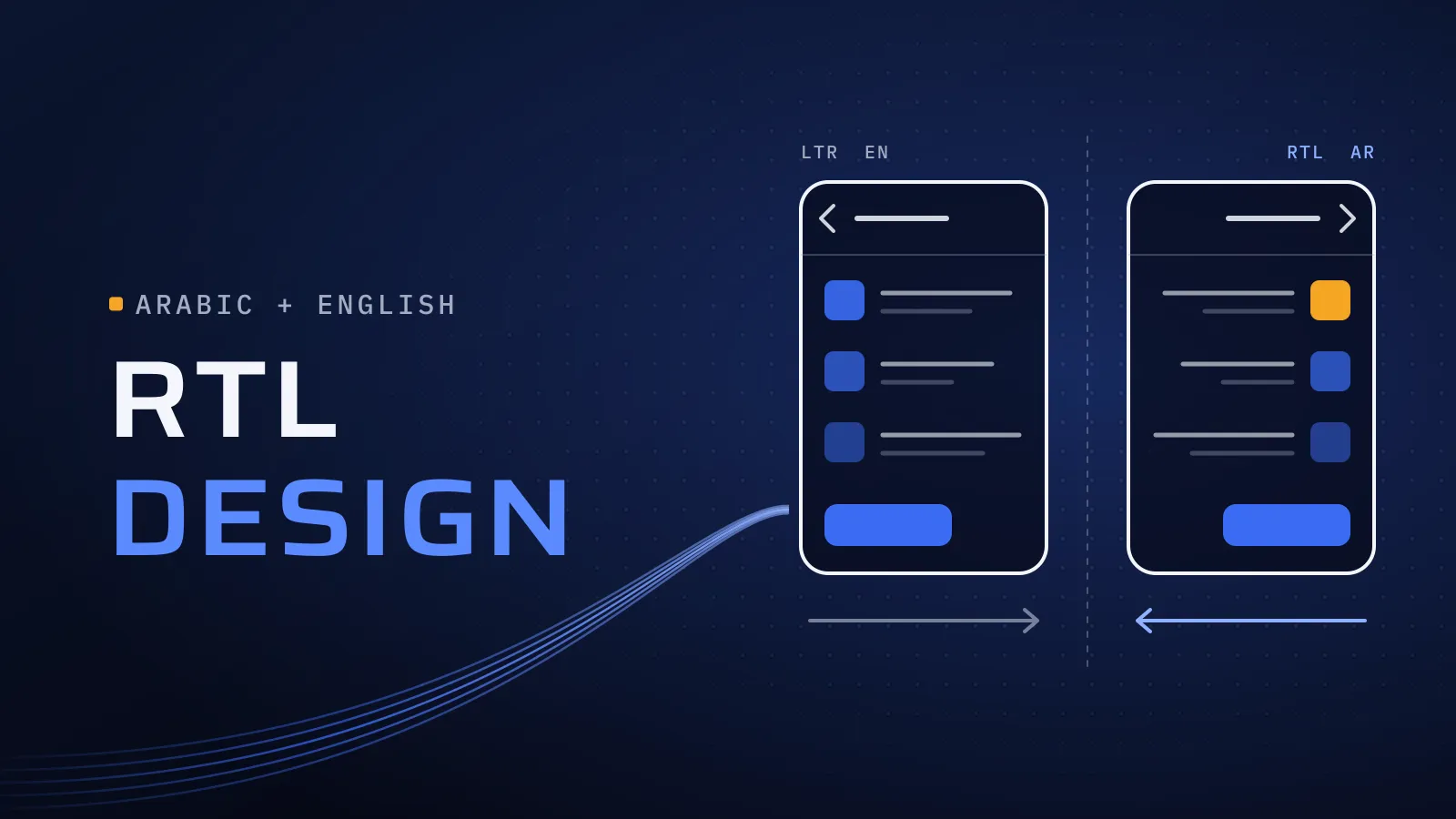
In Arabic, the whole interface reads from right to left, not only the text:
- Navigation: the back button moves to the right, and tabs and menus start from the right.
- Lists and cards: icons and avatars sit on the right, with text running towards the left.
- Progress: bars, steppers and sliders fill from right to left.
- Gestures: swiping to go back, and carousels, follow the new direction.
- Alignment: text aligns right, and so do form labels and table columns.
Photos, maps, videos and logos don’t mirror. They show the world, not a reading direction.
Icons that flip, and icons that don’t
Google’s Material Design guidance on bidirectionality sets out the main rules. The work is applying them to every icon in your own app:
| Icon or element | In right-to-left | Why |
|---|---|---|
| Back and forward arrows, chevrons | Flip | They point along the reading direction |
| Progress bars, sliders, steppers | Flip, filling from the right | Linear progress follows reading order |
| Icons with lines of text, such as a list or a document | Flip with care | The lines show which way text runs |
| A volume icon with its slider on one side | Flip | The slider follows the layout |
| Play, fast-forward and the media progress bar | Don’t flip | They show the direction of the media, not of reading |
| Clocks, circular refresh arrows, clockwise spinners | Don’t flip | Clocks turn the same way everywhere |
| The search magnifier and other objects held in the right hand | Don’t flip | They show a real object, not a direction |
| Logos and photos | Don’t flip | Your brand and the real world stay as they are |
| Phone numbers, card numbers, codes | Stay left to right | They are read digit by digit, left to right |
Numbers, dates and currency
- Digits. Choose between Western digits (0 to 9) and Eastern Arabic digits for each market and use the choice everywhere: screens, push messages, receipts and emails. Number fields should accept either kind when users type.
- Dates. Arabic month names, a clear day-month order and a date picker that opens in the right direction. Decide early whether any screen needs Hijri dates beside Gregorian ones, for example around Ramadan.
- Currency. Decide how each price reads in both languages, with the code or the Arabic word for the currency before or after the amount, and apply the same rule on screens, receipts and invoices.
Mixed Arabic and English on one line
Arabic screens often carry English as well: a brand name in an Arabic sentence, an email address, an order code such as A-1042. Displayed carelessly, the punctuation jumps to the wrong end and parts of the line swap places. Developers fix this by isolating each embedded piece of text so it keeps its own direction, and by setting the direction of messages and reviews from what the user typed, not from the app’s language. Test with real mixed strings, not placeholder text.
Fonts and line height
- An Arabic typeface, designed for Arabic, in weights that match your Latin font. The phone’s fallback Arabic font won’t match your brand.
- More line height. Arabic letters and their dots and marks reach higher and lower than Latin ones, so a tight line height clips them.
- Sizes per language. Arabic often reads smaller at the same point size, so set sizes for each language rather than reusing the English scale.
- No letter spacing, no italics, no capitals. Arabic letters join, so added spacing breaks words apart. Arabic has no capital letters and no true italics, so emphasis comes from weight or colour.
- Flexible widths. An Arabic label can be shorter or longer than the English one, so buttons and tabs need room in both.
Forms
Forms are where a translated app shows most. Labels and fields align right, but email, website and phone fields stay left to right inside an Arabic form. Name fields accept Arabic and Latin letters and leave room for names with several parts. Phone fields open on the right keyboard and start with your launch market’s country code. Error messages appear in the user’s language, next to the field they refer to.
App Store and Google Play listings in two languages
Your store listing is the first screen of the app. In App Store Connect, the default language for the UAE, Saudi Arabia, Qatar and Kuwait storefronts is English (U.K.), with Arabic as an additional supported language (Apple, App Store localizations). So the Arabic listing is something you add yourself. Google Play takes a separate listing for each language too.
For each store, plan the Arabic name, description, keywords and screenshots as their own copy, written for the words Arabic speakers actually search with, not translated line by line. Show the Arabic interface in the Arabic screenshots.
Testing with native speakers
- Phones set to Arabic, not only the app’s language switch, because system dialogs, keyboards and date pickers follow the device.
- People from your launch market, since vocabulary and expectations differ across Arabic-speaking countries.
- Real tasks: sign up, pay, find an order, contact support. Watch where they hesitate.
- The awkward cases: long names, mixed-language messages, the smallest phone you support and the largest text size users can set.
- Everything outside the app: push messages, emails, PDF receipts and error messages.
What to decide before design starts
Take this list to your co-founder or product lead. Each row changes every screen if it is settled late.
| Decide | Options | Why it comes first |
|---|---|---|
| Launch languages | Both at launch, or one first in a layout ready for right-to-left | Sets the layout of every screen |
| Default language | The phone’s language, or a choice on first open | Decides the first screen users see |
| Digits | Western or Eastern Arabic, per market | Applies to every number in the app |
| Calendar | Gregorian only, or Hijri as well on some screens | Shapes date pickers, bookings and reports |
| Arabic tone | Modern Standard Arabic or a local, more informal tone | Sets the voice of every label and message |
| Fonts | An Arabic typeface paired with your Latin one | Sets line heights and text sizes |
| Who writes the Arabic | Your team, a copywriter, or a translator plus a native reviewer | Decides when each design can be signed off |
| Store listings | Arabic name, keywords and screenshots for each store | Planned with the launch, not after it |
Launching in the UAE or the GCC? Send us your feature list or a prototype, and the markets you’re launching in. We come back with the decisions to settle before design and what designing both languages from the first wireframe covers. Plan your Arabic and English app →
Sharing this with a co-founder first? Ask for our company profile and we’ll send it to you.
What to ask an Arabic app development company
Every company on your shortlist will say it builds in Arabic. These questions show which ones have done it, and what to listen for in the answer:
| Ask | A good answer | Ask again if you hear |
|---|---|---|
| Who designs and checks the Arabic screens? | Native Arabic speakers on the team, designing both directions from the first wireframe | “A translator handles it once the English version is done” |
| Will we approve Arabic prototypes before the build? | Clickable prototypes in Arabic and English, side by side, with real Arabic text | English screens only, or placeholder Arabic |
| Which digits, calendar and Arabic tone suit our market? | Questions about your users first, then a recommendation for each market | One answer before they know who your users are |
| How do you handle Arabic and English on one line? | Each embedded name, email or code isolated in its own direction, and tested with real strings | “The phone takes care of that” |
| Who tests the Arabic version, and how? | QA separate from the developers, on phones set to Arabic, from the smallest screen up | Testing only through the app’s language switch |
| Who writes the Arabic store listings? | Arabic copy and screenshots, written for what Arabic speakers search | The English listing translated line by line |
| Which apps have you built for Gulf markets? | Named apps in the stores, and a meeting with the team that built them | Logos without names, or projects nobody can discuss |
| Whose name are the code and store accounts in? | Your company’s | Accounts held by the agency |
Would you rather add Arabic-speaking developers to your own team than hand over a project? See Arabic-speaking developers for hire: what to check.
Plan both languages before the first screen
Since 2014 we have worked with more than 100 clients across the UAE, Saudi Arabia, Qatar, Kuwait, the USA and Canada. Our core team are native Arabic speakers who work in English, so your meetings and documents stay in English while people who read Arabic natively check every Arabic screen. Ask us the last two questions too. Three apps we built for users in the Gulf:
- Massart, Saudi Arabia: a no-code app generator for building iOS and Android apps. Talk to the team that built it: book a meeting.
- Qargo, Qatar: a car rental and ride-hailing platform. Talk to the team that built it: book a meeting.
- Spoiled, Kuwait: an app for booking beauty specialists at home. Talk to the team that built it: book a meeting.
Two of the ways we work matter most for a bilingual product. UI/UX focus: user experience is considered from the beginning, which for Arabic and English means both directions from the first wireframe. Independent QA: a dedicated testing and quality assurance process, which is where flipped icons, clipped Arabic and scrambled phone numbers are caught before users see them. As a UI/UX design agency in Dubai, we design the Arabic right-to-left screens alongside the English ones, and our mobile app development company in Dubai page shows how we build Arabic and English apps. Still pricing the build? Our mobile app development cost guide covers what moves an app’s price.
Plan your Arabic and English app → We ask about your goal, what you use today, your timing and who else should be involved. You leave with clear next steps. We reply by email first and set up a call only if you want one. Asking commits you to nothing, and we sign an NDA first if you ask.
Frequently asked questions
Should we launch in Arabic, English or both?
Both, if your users are in the UAE or the wider GCC and switch between the two. If the budget forces a choice, launch in the language most of your first users prefer, in a layout already built for right-to-left. Adding the second language later then means writing copy, not redesigning screens.
How much does Arabic add to an app's cost?
It adds design and testing work on every screen, plus Arabic copy and Arabic store listings. Planned from the first wireframe, it is part of designing each screen once. Added to a finished app, every screen is reopened. Your price is agreed in your proposal, with both languages scoped from the start.
Is machine translation good enough for the Arabic version?
As a first draft, sometimes; for what users read, no. A short English label can become a long Arabic one, or the wrong word for the screen it sits on. Have a native speaker write or review every Arabic string in the design itself, where they can see the context, not in a spreadsheet.
Which digits should the Arabic version use?
Choose between Western digits (0 to 9) and Eastern Arabic digits for each market, check the choice with your own users, then apply it on every screen, receipt and notification. Whichever you choose, phone numbers, card numbers and codes stay left to right, and number fields should accept both kinds of digit when users type.
What should we ask an Arabic app development company?
Ask who designs and checks the Arabic screens, and whether you approve Arabic prototypes before the build. Ask how they handle digits, dates and Arabic and English on one line, who tests on phones set to Arabic, and who writes the Arabic store listings. Then ask to talk to the team behind an app they built for a Gulf market.
Who should test the Arabic version?
Native Arabic speakers from your launch market, using the app on their own phones set to Arabic. Give them real tasks, such as signing up, paying and finding an order, and note where they hesitate. Our core team are native Arabic speakers, and we still test with your users, because they are the ones who decide.