Odoo vs Business Central in the UAE: How to Choose When You Already Run Microsoft 365
Odoo vs Business Central in the UAE for Microsoft 365 companies: Arabic, VAT, e-invoicing, licences, data location, and when Business Central fits better.
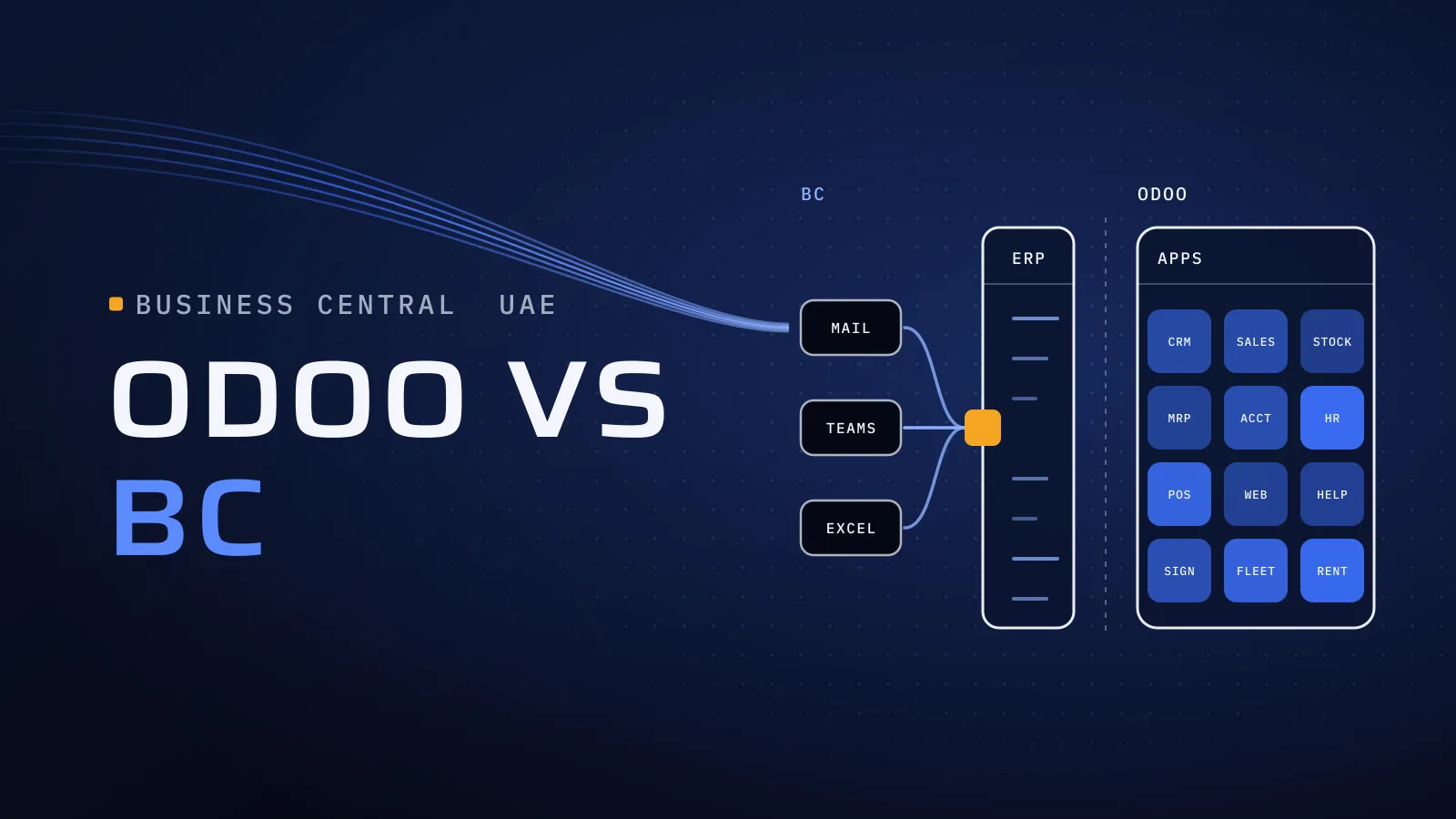
Odoo vs Business Central in the UAE is usually decided inside a company that already runs on Microsoft 365: mail in Outlook, files in SharePoint, chats in Teams and the month-end close in Excel. Business Central puts the ERP inside those tools. Odoo puts more of the business, from the warehouse to payroll, into one system that also works in Arabic. Choose for what most of your users need, and you stop paying for licences people won’t use.
Odoo vs Business Central in the UAE: which one fits?
Quick answer: Business Central fits a Microsoft-first company that wants its ERP inside Outlook, Excel and Teams, with online data held in the UAE. Odoo fits a company that needs Arabic screens, WPS payroll, e-commerce or point of sale in the same system, or manufacturing without a higher licence for every user. In Business Central, UAE VAT comes from a partner’s app.
On Microsoft 365 today? Tell us which Microsoft tools your teams rely on, and we’ll say what Odoo connects to and what it doesn’t.
What the wrong fit costs you
ERP licences are paid per user, every month, for as long as you run the system. Choose for the finance team alone, and the warehouse, drivers and sales reps either get full licences for screens they find hard to use, or stay on paper and WhatsApp. Timing matters too: companies under AED 50 million in revenue appoint an e-invoicing provider by 31 March 2027 and go live on 1 July 2027, as our UAE e-invoicing 2027 guide shows. Choose before then and you connect the ERP to the provider once.
What Microsoft 365 really adds, and what it doesn’t
Business Central was built to sit inside Microsoft 365. Staff sign in with their Microsoft account, create quotes from Outlook, edit lists in Excel and post them back, share records in Teams, and build reports and approvals in Power BI and Power Automate. Copilot comes with Essentials and Premium. Microsoft lists Copilot and the Teams app among the features the on-premises version lacks.
Odoo meets Microsoft 365 at fewer points, but the daily ones are covered. Staff sign in with their Microsoft accounts, mail runs through Outlook 365, calendars sync both ways, and the Outlook add-in creates leads, contacts, tasks and tickets from an email. Excel works through import and export. You give up Business Central’s Excel round trip, Teams cards and ready links to Power BI and Power Automate.
What this means for you: count who works where. If your heaviest ERP users spend the day in Outlook and Excel, the Microsoft links are worth paying for. If most work in a warehouse, a showroom or a van, Arabic screens and one system for stock, sales and payroll matter more.
How they compare for a UAE company
Every row checked on the vendors’ own pages on 27 October 2026.
| Business Central | Odoo | |
|---|---|---|
| Who sells it | Usually a Microsoft partner, who also implements | Odoo’s own price list; any implementer you choose |
| Licences | Essentials, Premium and Team Members, per user per month | Standard or Custom, per user per month; all apps in both |
| UAE localisation | A partner’s app on Microsoft’s international version | Odoo’s own UAE localisation |
| Hosting | Microsoft’s cloud, in the UAE for UAE environments; an on-premises version exists | Odoo Online; Odoo.sh or your own servers on Custom |
| Arabic | Not in Microsoft’s language list; Arabic on documents only | Arabic screens, right to left; bilingual invoices |
| VAT and Corporate Tax | The partner’s UAE app and financial reports | VAT201 and Corporate Tax reports |
| E-invoicing | The partner’s app or a connector to an ASP | A connector to an ASP |
| Microsoft 365 | Outlook, Excel, Teams, Power BI, Power Automate, Copilot | Microsoft sign-in; Outlook mail, calendar and add-in; Excel import and export |
| Manufacturing | Premium, for every full user of that company | Manufacturing app in both paid plans |
| Several companies | Multiple companies in each environment | Companies and branches in one database (Custom) |
| Payroll and WPS | Imports payroll from a provider or a partner app | Payroll app with UAE WPS files |
| CRM, e-commerce, POS | Contacts and opportunities; fuller CRM is Dynamics 365 Sales | CRM, website, e-commerce and POS apps |
| Updates and changes | Online updates twice a year; extensions in AL | Studio and Python modules; a major version each year |
UAE localisation, Arabic and e-invoicing
Microsoft lists the UAE as available for Business Central online, localised by partners on its international version, with UAE environments deployed to the UAE Azure geography (Microsoft Learn). So your online data sits in the UAE, though some Copilot features process data in another geography once an administrator allows it. Your VAT return, Arabic layouts and e-invoicing come from the partner app you choose: ask who publishes it, what it costs and how quickly it follows Microsoft’s updates. Odoo Online is hosted in Odoo’s own regions, with backups replicated in Europe and Canada; to keep Odoo data in the UAE, run it on your own servers or a UAE cloud (Custom plan).
The same Microsoft page lists the languages Business Central supports, and Arabic isn’t among them. Staff work in English, and Arabic appears on documents through report layouts or the partner’s app. Odoo works in Arabic on screen, right to left, and its UAE taxes, VAT201 report and Corporate Tax report are Odoo’s own, as our Odoo VAT setup guide shows.
Neither Microsoft nor Odoo is on the Ministry of Finance list of accredited e-invoicing providers, so both connect to the provider you choose. Odoo and ClearTax have announced a native integration without a date; our Odoo ASP integration guide compares the routes available today.
Licences and the total cost
Microsoft’s Business Central pricing page showed these US list prices on 27 October 2026, per user per month, paid yearly: Essentials US$80, Premium US$110, and Team Members US$8 for people who mainly read data, approve and update selected records. Microsoft notes that prices vary by country and currency, so ask for the UAE price. Two rules shape the bill:
- Manufacturing needs Premium, and Microsoft’s documentation says users with an Essentials licence can’t sign in to a company set to Premium. In a company that manufactures, every full user is on Premium.
- The UAE localisation is a partner app, usually with its own fee beside Microsoft’s licence.
Odoo’s per-user prices, its first-year discount and the light-user rate are in our Odoo licence calculator. Every app, manufacturing included, is in both paid plans; several companies, Studio, your own servers and outside systems calling Odoo’s API need Custom.
The other cost drivers are shared: processes mapped, data migrated, Arabic documents, the ASP connection, integrations, custom code retested after each update, and support. Price both on one scope over the same years.
When Business Central fits better
- Finance lives in Excel, and the Excel round trip, Power BI and Outlook are why you want an ERP.
- IT is a Microsoft shop, with Power Automate flows already running and an admin who knows the Power Platform.
- Data must stay in the UAE on a vendor-run cloud, and you don’t want to run servers.
- You’re moving from Dynamics NAV or GP, or your group runs Dynamics 365. Microsoft provides tools to migrate to Business Central online.
- Your staff work in English, and Arabic is needed only on printed documents.
Then Business Central is the stronger choice: talk to a Microsoft partner with a UAE localisation app. We implement Odoo only. Comparing with SAP instead? Read Odoo vs SAP Business One in the UAE.
Which way do you lean?
Mark the rows that describe you.
| Your situation | Leans to | Why |
|---|---|---|
| Finance works in Excel and Outlook most of the day | Business Central | Excel and Outlook add-ins, Power BI |
| Warehouse staff, drivers or sales reps who prefer Arabic | Odoo | Arabic screens; none in Business Central |
| You manufacture, but most users never touch production | Odoo | No Premium licence for every user |
| Online data must stay in the UAE without your own servers | Business Central | UAE Azure geography |
| Payroll and WPS files from the system that holds your accounts | Odoo | Payroll app with WPS files |
| A showroom, an online store or point of sale | Odoo | Same subscription, same stock |
| Moving from Dynamics NAV or GP | Business Central | Microsoft’s migration tools, familiar screens |
| Approvals already built in Power Automate | Business Central | Ready connectors |
Leaning one way? Send us the Microsoft 365 tools your teams use, how many people work in finance, the warehouse and sales, whether you manufacture, what you run today and your e-invoicing date. We reply with what Odoo connects to, what stays in Microsoft 365 and where Business Central would serve you better. Check Odoo against your Microsoft 365 setup →
Not ready for a call? Ask for our company profile and we’ll send it to you.
How to test both before you sign
- Count users by what they do: full users, approvers and readers, and staff only on payroll. That count sets both bills.
- List the Microsoft 365 jobs that must keep working, such as a quote from Outlook or an approval in Teams, and ask each side to show them live.
- Ask for a UAE tax invoice in Arabic and English and a VAT return on each product, then a test e-invoice through an ASP.
- Ask who publishes the UAE localisation, and who updates it after each Microsoft or Odoo release.
- Let a few warehouse and sales staff try both on their own daily tasks, in the language they prefer.
Moving to Odoo from Business Central, NAV or GP
The data moves; the extensions don’t. Bring across the chart of accounts, customers and vendors with TRNs, items with their tracking, open customer and vendor entries, stock at cost and opening balances. Dimensions usually become Odoo analytic accounts, so agree the mapping with whoever reads the management reports. Each extension’s job is rebuilt in Odoo’s configuration, or in a module where configuration can’t do it.
Keep the old system readable for history and FTA requests, and ask your Microsoft partner what that needs once your subscription changes. Cut over when a VAT period or financial year starts, and connect Odoo to your provider in the same project. Coming from Tally instead? Read our Tally to Odoo migration guide.
Who sets up your Odoo
We implement Odoo for UAE businesses. From Dubai Digital Park, our Odoo team leads your rollout: processes, data migration, Microsoft sign-in and Outlook setup, Arabic documents and the ASP connection. Since 2014 we have built software for more than 100 clients, on stacks that include .NET and Python, so a Microsoft-first IT team finds engineers who know its tools. Our core team are native Arabic speakers who work in English. Every project runs with:
- CTO oversight on the user count, licence plan and integrations before anything is bought.
- Independent QA that tests Microsoft sign-in, calendar sync and the bilingual tax invoice before each release.
- A dated plan in FloPlan, our own delivery software, so you see every phase before it starts.
Outside Odoo, we also build custom ERP: Al-Mawared ERP is a web-based ERP for exchange companies across the MENA region. Talk to the team that built it: book a meeting.
Bring your Microsoft 365 setup and your user count
Tell us your Microsoft 365 tools, how many people work in each team, what runs your accounts and stock today and your e-invoicing date. Our Odoo implementation services in the UAE cover the Microsoft sign-in, data migration, tax setup and the link to your e-invoicing provider.
Check Odoo against your Microsoft 365 setup → We ask about your goal, what you use today, your timing and who else should be involved. You leave with clear next steps. We reply by email first and set up a call only if you want one. Asking commits you to nothing, and we sign an NDA first if you ask.
Microsoft’s Business Central pricing page and Learn documentation, the Ministry of Finance ASP list, and Odoo’s pricing page and cloud SLA checked on 27 October 2026.
Comparing other systems? Read Odoo vs Zoho, Odoo vs SAP Business One, Odoo vs QuickBooks, Odoo vs ERPNext and Odoo vs NetSuite for the UAE.
Frequently asked questions
Does Business Central work in Arabic?
Not on screen. Microsoft's list of supported Business Central languages doesn't include Arabic, so staff work in English, and Arabic appears on printed documents through report layouts or a partner's UAE app. Odoo's screens run in Arabic, right to left. If your warehouse or sales team prefers Arabic, let a few of them try both before you choose.
Can Odoo work with Outlook, Excel and Microsoft sign-in?
Yes. Staff can sign in to Odoo with their Microsoft accounts, Odoo sends and receives mail through Outlook 365, calendars sync both ways, and the Outlook add-in creates leads, contacts, tasks and tickets from an email. Excel works through import and export. Business Central's deeper Excel, Teams and Power BI links remain its real advantage.
Where is Business Central data stored for a UAE company?
Microsoft deploys Business Central online environments with the UAE localisation to its UAE Azure geography. Odoo Online is hosted in Odoo's own regions, with backups replicated in Europe and Canada. If your Odoo data must stay in the UAE, run it on your own servers or a UAE cloud, which the Custom plan allows.
What does Business Central cost per user?
Microsoft's US list prices, checked on 27 October 2026, are US$80 per user per month for Essentials, US$110 for Premium and US$8 for Team Members, paid yearly, and Microsoft notes that prices vary by country. Add the partner's UAE localisation app, implementation and support. Odoo's per-user prices are in our licence calculator.
We manufacture. Which Business Central licence do we need?
Premium, which adds manufacturing and service management. Microsoft's documentation says users with an Essentials licence can't sign in to a company set to the Premium experience, so every full user of that company needs Premium. In Odoo, the Manufacturing app is included in both paid plans.
Who connects Business Central or Odoo to our e-invoicing provider?
Neither Microsoft nor Odoo is on the Ministry of Finance list of accredited providers, so both connect to the ASP you choose. In Business Central that comes through the partner's UAE app or a connector; in Odoo, through a connector, with a native ClearTax integration announced but not dated. Ask to see a rejected invoice corrected and resent before go-live.