Odoo VAT in the UAE: Setting Up VAT and Corporate Tax So Your Returns Add Up
Odoo VAT UAE setup: emirate taxes, TRNs and tax invoices, the VAT201 report, Corporate Tax tags, the FTA audit file and the mistakes to check first.
Odoo VAT in the UAE is mostly installed for you: the UAE localisation brings the taxes, the VAT return and a Corporate Tax report. What it can’t decide is how your business reports, and that is where returns go wrong. Settle those choices once and the figures come out of Odoo ready for EmaraTax; leave the defaults and finance rebuilds every return in a spreadsheet.
How do you set up Odoo VAT in the UAE?
Quick answer: Odoo’s UAE localisation installs 5% VAT for each emirate, zero-rated, exempt, reverse-charge and out-of-scope taxes, and a VAT201 report you export for EmaraTax. You set your TRN and emirate, save business customers with their TRNs, decide which emirate each sale reports under, and tag accounts for the Corporate Tax report, which starts unclassified.
Already filing from Odoo? Ask us to check your Odoo tax setup.
What a wrong setup costs you
A setup error repeats on every invoice until someone notices, usually at the return. The FTA’s VAT Returns User Guide lets you correct an error that understated tax by up to AED 10,000 in your next return; above that, it calls for a voluntary disclosure. Corporate Tax adds a yearly date: the return is due within nine months of your financial year-end, and it goes only as fast as your accounts are tagged. A day spent on the setup now saves that rework every quarter.
What Odoo’s UAE localisation gives you, and what you set up
Take this table to your finance lead. The middle column comes with Odoo, as its UAE localisation documentation describes; the right-hand column is yours to decide and test.
| Area | Built into Odoo’s UAE localisation | What you set up and check |
|---|---|---|
| Company | A UAE chart of accounts with separate VAT payable and receivable accounts | Your TRN and emirate on the company record. Odoo takes the default sales tax from the company’s emirate when the chart is installed, and uses Dubai’s if none is set |
| Sales taxes | 5% for each of the seven emirates, 0%, 0% export, exempt, out of scope and tourist refunds | Which emirate each sale reports under (next section) |
| Purchase taxes | 5%, 0%, exempt, reverse charge, import VAT and postponed import VAT | A country on every foreign supplier, so reverse charge applies; import VAT taken from the customs declaration |
| Customer invoices | A Tax Invoice for business customers and a Simplified Tax Invoice for individuals; Arabic as a second language through the Gulf Cooperation Council Format setting | Business customers saved as companies, with their TRN; the Arabic layout checked on your own invoice |
| Foreign currency | Automatic rates from the Central Bank of the UAE; AED amounts shown on foreign-currency invoices | Automatic rates switched on |
| VAT return | A VAT201 report in the FTA’s format, exported to Excel or PDF | Your return period in the settings. Odoo doesn’t submit the return; you enter its figures in EmaraTax |
| FTA audit file | Generated from the general ledger in Odoo 19 and 20 | One file produced and checked before the FTA asks for it |
| Corporate Tax | A report of net profit, exempt income, allowable deductions, disallowed expenses and the tax amount | Every relevant account tagged; nothing is tagged by default |
Which emirate does each sale report under?
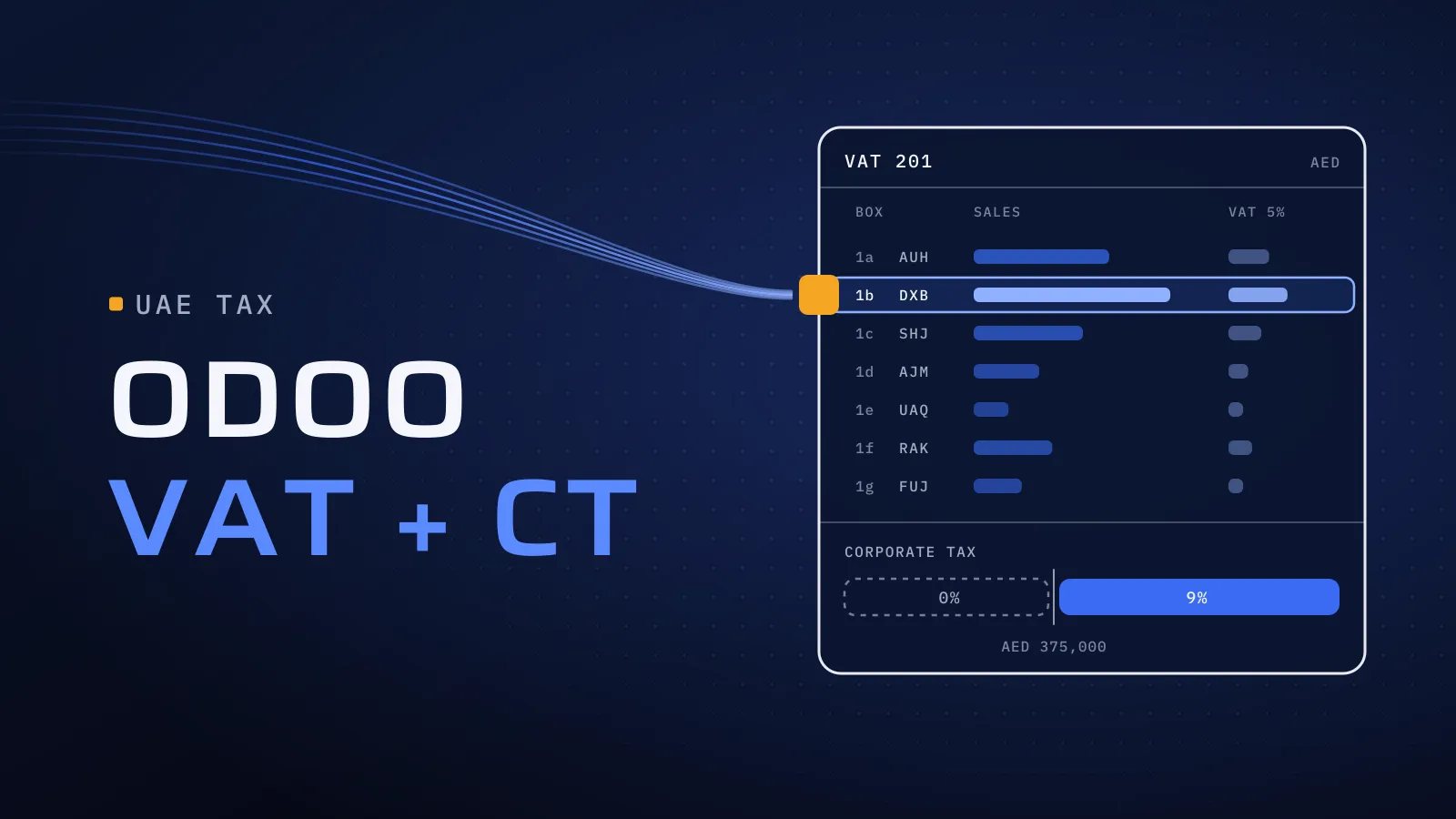
Box 1 of the VAT201 splits standard-rated sales by emirate, and Odoo has a 5% tax for each one. Two rules meet here:
- Odoo’s standard UAE setup switches the 5% tax to the customer’s emirate automatically, through fiscal positions that read the customer’s address. A customer in Sharjah gets the Sharjah tax.
- The FTA’s guide says a business with a fixed establishment in the UAE reports each supply in the emirate where the fixed establishment most closely connected to it is located. A business without one reports it where the supply was received.
For a company that sells only from a Dubai office, those two rules can put a Sharjah customer’s invoice in different boxes. Decide the rule for your business with your tax adviser, set Odoo’s fiscal positions and default taxes to follow it, and check the result on last quarter’s invoices before the next return. If you have branches in more than one emirate, settle this first. Either way, every UAE customer needs an emirate in its address.
Corporate Tax in Odoo: the report starts empty
Odoo’s Corporate Tax report sits under Accounting, Reporting, Corporate Tax Report. It works out the tax from your profit and loss, and Odoo’s documentation is plain that no account is classified for you:
- Exempt income, such as dividends from qualifying shareholdings: give the account the report’s “Exempted Income Accounts” tag.
- Allowable deductions, such as salaries, rent and professional fees: give the account the report’s “Allowable Deductions Accounts” tag.
- Disallowed expenses, such as fines, personal costs and entertainment beyond the permitted limits: give the account a fiscal category, then a start date and rate in its Fiscal Rates tab.
The rates behind the report: 0% on taxable income up to AED 375,000 and 9% above it. Small Business Relief, for revenue up to AED 3 million, now covers tax periods ending by 31 December 2029 under Ministerial Decision No. 131 of 2026, and you elect it in the return itself. Odoo 19 reworked the report for companies under the AED 375,000 threshold or with a net loss. Which accounts are exempt or disallowed is your tax adviser’s call; our part is to set the tags, run last year through the report and compare it with what you filed.
Your tax setup is also your e-invoicing setup. From 2027, every tax code maps to an e-invoice category and every business customer needs a correct TRN, so the work above is the first half of connecting Odoo to your e-invoicing provider.
Six Odoo VAT setup mistakes to check first
- No emirate on the company when the chart was installed, so the default sales tax is Dubai’s, wherever you are.
- Business customers saved as individuals, who then receive a Simplified Tax Invoice instead of the Tax Invoice they need to reclaim VAT.
- Foreign suppliers with no country, so Odoo can’t tell they are abroad and doesn’t pick the reverse-charge tax for their services.
- Import VAT keyed as a normal purchase. Odoo’s import tax records only the VAT from the customs declaration, which is what the return expects.
- The Corporate Tax report run before tagging, which shows profit with no adjustments and looks finished when it isn’t.
- Entries posted into a filed quarter, which change a return already submitted. Odoo’s tax lock date stops that.
How to set up and check Odoo VAT, step by step
- Fix the company and contacts. TRN and emirate on the company; every business customer saved as a company with its TRN and emirate; every foreign supplier with its country.
- Settle the taxes. Decide the emirate rule, set fiscal positions and default taxes to match, and check the tax on each product category.
- Tag the Corporate Tax accounts with your tax adviser: exempt income, allowable deductions and disallowed expenses.
- Test on a quarter you have filed. On a copy of your database, run Odoo’s VAT201 for that quarter and compare it box by box with your return. Run the Corporate Tax report for last year the same way.
- File, then lock. Export the VAT201, enter it in EmaraTax, post the tax closing entry and set the tax lock date.
Want your Odoo tax setup checked before the next return? Send us your Odoo version, the emirates you sell from and a screenshot of your tax list. We reply with what to check in your taxes, fiscal positions and Corporate Tax tags, and what to test on a copy of your database. Ask us to check your Odoo tax setup →
Not ready for a call? Ask for our company profile and we’ll send it to you.
Who sets it up
We implement Odoo for UAE businesses from Dubai Digital Park, with our core engineering team in Alexandria, and we have implemented and upgraded Odoo for clients whose names stay under NDA. We configure Odoo; your tax adviser decides the treatment. Our job is to make Odoo follow it and prove it against returns you have already filed. Quality is built into every step:
- CTO oversight on the tax design, including the emirate rule, before anything is configured.
- Independent QA before each release: someone who didn’t configure the taxes compares Odoo’s VAT201 with your filed return, box by box.
- A dated plan in FloPlan, the delivery software we built and use ourselves, timed so the setup is tested before your next return is due.
Outside Odoo, we build finance software from scratch. Al-Mawared ERP is a web-based ERP we built for exchange companies across the MENA region. Talk to the team that built it: book a meeting.
Still on Tally? Our Tally to Odoo migration guide shows how to move without splitting a VAT return between two systems.
Bring your last VAT return
Tell us your Odoo version, where it is hosted, which emirates you sell from and when your next return is due. Tax setup, testing and the connection to your e-invoicing provider are part of our Odoo implementation services in the UAE.
Ask us to check your Odoo tax setup → We ask about your goal, what you use today, your timing and who else should be involved. You leave with clear next steps. The call commits you to nothing, and we sign an NDA first if you want one.
Odoo’s UAE localisation documentation and the FTA’s VAT Returns User Guide checked on 27 October 2026.
Frequently asked questions
Does Odoo file the VAT return with the FTA?
No. Odoo builds the VAT201 report in the FTA's format and exports it to Excel or PDF; you enter the figures in EmaraTax and submit there. Because the report reads your posted entries directly, a correct setup means the export matches what you file, with no spreadsheet in between.
Does Odoo handle UAE Corporate Tax?
Odoo's Corporate Tax report shows net profit, exempt income, allowable deductions, disallowed expenses and the tax due, once your accounts are tagged; none are tagged by default. You file the return in EmaraTax within nine months of your year-end. Tag the accounts before the year closes and the report is ready when you need it.
Can Odoo print Arabic tax invoices?
Yes. The Gulf Cooperation Council Format setting adds Arabic as a second language on tax invoices, and Point of Sale receipts have the same option. Check the layout on your own invoice before go-live. Our core team are native Arabic speakers, so that check is done by people who read Arabic every day.
Which Odoo versions generate the FTA audit file?
Odoo 19 and 20 generate the FTA VAT audit file from the general ledger, according to Odoo's release notes. On an older version, plan an upgrade, which also brings you back into standard support. Producing one file now, before anyone asks for it, shows whether your ledger is ready.
Are the VAT201 and Corporate Tax reports in Odoo Community?
No. They are part of Odoo Enterprise's accounting reports. Community has the UAE taxes and chart of accounts, but not these reports, so most UAE companies that file from Odoo run Enterprise. Our Odoo implementation cost guide compares the plans and their prices.
What if past returns were filed from a wrong setup?
Fix the setup first, then rerun the affected quarters in Odoo and compare them with what you filed. The FTA's guide lets you correct an error of up to AED 10,000 of tax in your next return; above that, it calls for a voluntary disclosure, which your tax adviser handles. Either way, the corrected setup stops the error repeating.