Odoo for Trading Companies in the UAE: Imports, Stock, Credit and VAT in One System
Odoo for trading companies in the UAE: apps for imports, landed costs, warehouses, credit, VAT, Arabic invoices and sales reps, and what needs extra work.
Odoo for trading companies in the UAE pays off where a trader quietly loses margin: freight and duty that never reach the product cost, stock spread over warehouses nobody sees at once, and customers who keep ordering past their credit. Most of that is standard Odoo, set up for the way you trade; a few UAE habits, such as post-dated cheques and van sales, need a module or custom work.
How does Odoo work for a trading company in the UAE?
Quick answer: Standard Odoo covers most of a UAE trader’s day: Purchase and Inventory for imports, landed costs and several warehouses; Sales for pricelists and credit limits; Accounting for currencies, UAE VAT, import VAT and Arabic tax invoices. Per-warehouse costing, post-dated cheques, credit holds that block an order, long offline van routes and the e-invoicing connection need extra work.
Importing and reselling? Send us one recent shipment and we’ll map it to Odoo for you.
What a default setup costs a trader
Book freight, duty and clearing as expenses instead of stock value, and every item looks more profitable than it is, so your team quotes from the wrong cost. Leave the credit limit as a warning nobody reads, and the slow payer keeps ordering.
2027 adds a deadline. Businesses with revenue of AED 50 million or more start e-invoicing on 1 January 2027, with a provider appointed by 30 October 2026; smaller ones on 1 July 2027, with a provider by 31 March 2027, as our UAE e-invoicing 2027 guide sets out. A trader buys as well as sells, and the receiving side needs a provider too.
Odoo for trading companies: which apps cover what
The middle column is standard Odoo; the last is what needs care, a module or custom work.
| What you need | Odoo apps | Standard in Odoo | Needs setup, a module or custom work |
|---|---|---|---|
| Several warehouses | Inventory, Barcode | Warehouses, transfers, reordering rules, lots and expiry dates, barcode scanning | One cost per product per company; a per-warehouse cost needs a module |
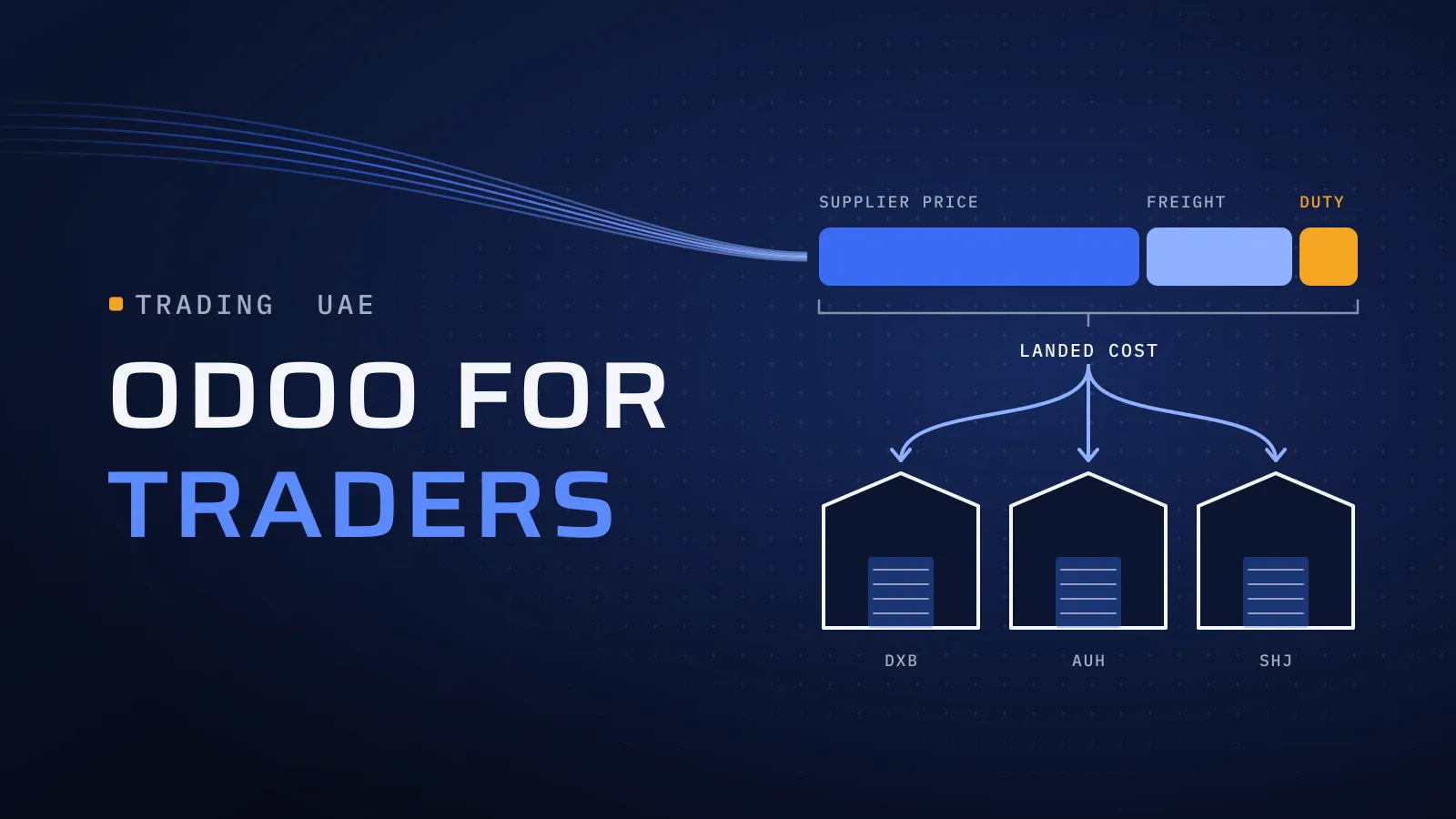
| Imports and landed costs | Purchase, Inventory, Accounting | Freight, insurance, duty and clearing added to a receipt’s value, split by quantity, cost, weight, volume or equally | Products on FIFO or average cost; a landed-cost product per charge |
| Buying in other currencies | Purchase, Accounting | Bills and payments in any currency, automatic Central Bank of the UAE rates, exchange differences posted | A fixed rule for bank charges on supplier transfers |
| Pricelists and credit | Sales, Accounting | Pricelists by customer group, currency, quantity and date; a credit limit that warns on quotations and invoices | The warning doesn’t stop the order; a credit hold or manager approval is a small custom rule |
| VAT on imports | Accounting (UAE localisation) | Import VAT, postponed import VAT and reverse-charge purchase taxes, feeding the VAT201 | A sales tax and fiscal position for domestic reverse-charge goods (below) |
| Post-dated cheques | Accounting | Payments and bank reconciliation | A cheque register with maturity dates isn’t standard |
| Arabic documents | Accounting, Sales, Inventory | Arabic as a second language on tax invoices; Arabic product names | Quotations, delivery notes and statements in Arabic, each with its own layout |
| Sales reps in the field | Sales, CRM, Odoo mobile app; Point of Sale for vans | Orders, prices and stock on a phone; Point of Sale sells offline | Long offline routes, collections, invoices printed in the van |
| E-invoicing from 2027 | Accounting, plus a connector | TRNs, tax codes and invoice data from the localisation | The connection to your accredited provider: Odoo has no built-in UAE e-invoicing module yet |
A free zone entity with its own TRN is a second company in Odoo, and multi-company needs Odoo’s Custom plan, as do Studio and Apps Store modules. Check your licence in the Odoo licence calculator.
Odoo inventory for UAE traders: warehouses, lots and counts
Odoo inventory in the UAE is mostly a set of decisions about where stock sits and how it leaves. Settle these with your warehouse lead before the first receipt:
- A warehouse per site. A store in Jebel Ali, a showroom in Sharjah and each van get their own warehouse or location. Stock moves between them as transfers, and one warehouse can be set to resupply another.
- Free zone stock. A free zone entity with its own TRN is a second company. Goods leaving a designated zone for the mainland can carry customs duty and VAT, so agree with your tax adviser how that move is recorded before treating it as a plain transfer.
- Receipts and deliveries in steps. One step suits a small store. Two or three steps (receive, check, put away; pick, pack, ship) suit a warehouse where several people handle the goods.
- Lots and expiry dates. Food, cosmetics and medical stock tracked by lot, with First Expired, First Out picking, so the oldest batch ships first and a recall finds every customer who bought it.
- Reordering rules. A minimum and maximum per product and warehouse, so Odoo proposes the purchase order before a fast seller runs out.
- Cycle counts. A count frequency per location, so the busy store is counted often and slow stock less, with the Barcode app on the warehouse floor.
- Marketplace stock. Stock held by Noon or Amazon gets its own location; our Odoo Noon integration guide shows how orders and stock sync.
Landed costs: duty in, recoverable VAT out
The landed cost decides every margin report, so set it up before the first import. Odoo’s landed costs feature adds charges such as freight, insurance and customs duty to the value of goods received, for products valued at FIFO or average cost. Each charge attaches to a validated receipt, so the clearing agent’s bill lands on the right shipment. Three rules keep the numbers honest:
- Duty goes in. Customs duty, freight, insurance and clearing are part of what the goods cost.
- Recoverable VAT stays out. A VAT-registered importer recovers import VAT through the return.
- One charge, one split. Freight usually splits by weight or volume, duty by value; set the rule on each landed-cost product.
VAT on imports and the reverse charge
A VAT-registered importer accounts for import VAT itself, under the reverse charge, in the return for the period of import. Since 1 January 2026 no self-issued tax invoice is needed, but you keep the supporting documents, such as the supplier’s invoice and the customs declaration, says the FTA’s public clarification VATP046. Odoo’s UAE localisation has a postponed import tax for VAT declared in the return and an import tax for VAT paid at customs; attach the declaration to the bill.
Two kinds of goods move the VAT to the buyer even inside the UAE, when sold to a registered business that resells them:
- Electronic devices, since 30 October 2023: mobile phones, smartphones, computers, tablets and certain parts (Cabinet Decision No. 91 of 2023).
- Metal scrap, since 14 January 2026, for resale or processing (Cabinet Decision No. 153 of 2025).
The seller charges no VAT; the buyer accounts for it. Odoo has a reverse-charge purchase tax, and the selling side needs its own tax and fiscal position, set with your tax adviser. Our Odoo VAT setup guide covers the emirate rule and the VAT201 check.
The same amendments tie VAT recovery to e-invoicing: where an e-invoice is required, you need it in that format to recover the input VAT. See connecting Odoo to your e-invoicing provider.
Sales reps: three ways to put Odoo in the field
- Odoo’s own app. Reps use Sales and CRM on their phones, with their pricelist and stock by warehouse. Odoo 19 and 20 cover short connection drops; Odoo says its offline mode isn’t meant for long periods.
- Point of Sale in the van. The van is a stock location, and Point of Sale keeps taking orders offline, then syncs. It suits cash and card sales most.
- A field app connected to Odoo. Long offline routes, collections against open invoices and invoices printed in the van call for a dedicated app on Odoo’s API, which needs the Custom plan. Our own FloSales app covers orders, visits and collections in the field, synced with the back office.
How to set up Odoo for a trading company, step by step
- Map one shipment and one sale: purchase order in dollars, landed costs, stock by warehouse, quotation, delivery, Arabic tax invoice, payment or cheque.
- Settle costing and VAT first, with your finance lead and tax adviser: costing method, splits, reverse-charge goods, the emirate rule.
- Clean and load your data: customers with TRN, emirate and credit limit; suppliers with country and currency; stock by warehouse. Coming from Tally? Our Tally to Odoo migration guide shows what moves and when.
- Test with real documents: re-run last month’s import against your spreadsheet, rerun one VAT quarter and check the Arabic invoice on paper.
- Connect e-invoicing and go live at a VAT-period start, so your first return comes from one system.
Decision checklist for traders
Each row you tick changes the setup, the plan or the licence, so name them before you compare quotes.
| If this is true for you | Plan for |
|---|---|
| You pay freight, duty or clearing in addition to the supplier price | Landed costs and a split rule per charge |
| The same item lands at different costs per warehouse | A per-warehouse costing module |
| Your free zone entity has its own TRN | Multi-company on the Custom plan |
| You sell phones, computers, tablets or metal scrap to resellers | Domestic reverse-charge taxes |
| Customers pay by post-dated cheque, or over-limit orders must stop | A cheque register and a credit hold rule |
| Reps sell from vans or where the signal drops | Point of Sale per van, or a field app on Odoo’s API |
| You run Tally or Excel today | A data migration timed to a VAT period |
What this means for you: most of a trading business is standard Odoo, set up with care. Your ticked rows show where the extra work sits; ask every quote how it handles them.
Want this checklist turned into a plan? For an estimate, send us:
- what you trade and how many products;
- your warehouses and companies, mainland and free zone;
- where you import from, and in which currencies;
- how many people will use Odoo, and how many sell in the field;
- what you run today: Tally, Excel or another system;
- your VAT quarter and your e-invoicing date.
We reply with the apps, what is standard, what needs a module or custom work, and the effort, team and price. Scope your trading rollout →
Not ready for a call? Ask for our company profile and we’ll send it to you.
Who runs your rollout
We implement Odoo for UAE businesses from Dubai Digital Park, with our core engineering team in Egypt, and our Odoo team leads the rollout. Quality is built into every step:
- CTO oversight on the costing method and tax design, the two decisions hardest to undo.
- Independent QA before each release, re-running a shipment’s landed cost and a VAT quarter.
- A dated plan in FloPlan, the delivery software we built and use, with each test and the go-live date.
Our core team are native Arabic speakers, so bilingual invoices are checked by people who read Arabic daily. Outside Odoo, we build ERP software from scratch: Al-Mawared ERP is a web-based ERP we built for exchange companies across the MENA region. Talk to the team that built it: book a meeting.
Bring one shipment
Send us one recent import, from the supplier’s invoice to the customer’s, with your warehouses and e-invoicing date. Migration, VAT, the e-invoicing connection and custom modules are part of our Odoo implementation services in the UAE; our Odoo implementation cost guide shows what sizes a rollout.
Scope your trading rollout → We ask about your goal, what you use today, your timing and who else should be involved. You leave with clear next steps. We reply by email first and set up a call only if you want one. Asking commits you to nothing, and we sign an NDA first if you ask.
Odoo’s landed costs, inventory, UAE localisation and offline mode documentation, and the FTA’s public clarification VATP046, checked on 27 October 2026.
Frequently asked questions
Is Odoo a good fit for a small trading company in the UAE?
It fits once stock, purchasing and sales need to sit with the accounts: several warehouses, imports with freight and duty, pricelists by customer, or sales reps outside the office. If you only issue invoices and file VAT, an accounting package can be enough for now. When the work around it starts to grow, Odoo lets you start with a few apps and add the rest later.
Can Odoo handle landed costs and customs duty?
Yes. Odoo's landed costs feature adds freight, insurance, customs duty and clearing charges to the value of the goods received, split equally or by quantity, cost, weight or volume. It needs products valued at FIFO or average cost. If you are VAT registered, keep import VAT out of the landed cost, because you recover it through your return. Set it up this way and every margin report starts from the real cost.
Does Odoo stop a customer who is over their credit limit?
Not by default. With the Sales Credit Limit setting on, Odoo shows a warning on the quotation and the invoice, but the order can still be confirmed. If an over-limit order must stop or go to a manager, that is a small custom rule added during the rollout, so your credit policy is applied the same way by everyone.
Can our sales reps use Odoo without a signal?
For short drops, yes: Odoo 19 and 20 keep working offline and sync when the connection returns, and Point of Sale keeps taking orders offline. Odoo says its offline mode is not meant for long periods offline. For long van routes, collections and printed invoices in the field, a dedicated field app connected to Odoo does the job, and your office still sees every order in Odoo.
Which Odoo plan does a trading company need?
Standard on Odoo Online covers the core apps for one company. You need the Custom plan for a second company, such as a free zone entity with its own TRN, for Studio, for outside apps that call Odoo, or for modules such as per-warehouse costing, which also need Odoo.sh or your own servers. The licence calculator in our Odoo cost guide works out the bill for your users.
What does an Odoo rollout for a trading company cost?
The licence is Odoo's published price per user, which you can check yourself. The rollout follows your scope: the apps, warehouses and companies, the data you move, and any modules or custom work from the table in this guide. Send us those details and we reply with the effort, the team and the price, agreed in your proposal before any work starts.