AI Agent for Odoo in the UAE: Orders From Email, PDF and WhatsApp, Drafted for Your Team to Approve
AI agent for Odoo in the UAE: orders from email, PDF and WhatsApp become draft quotations your team approves, in Arabic and English. Where to start.
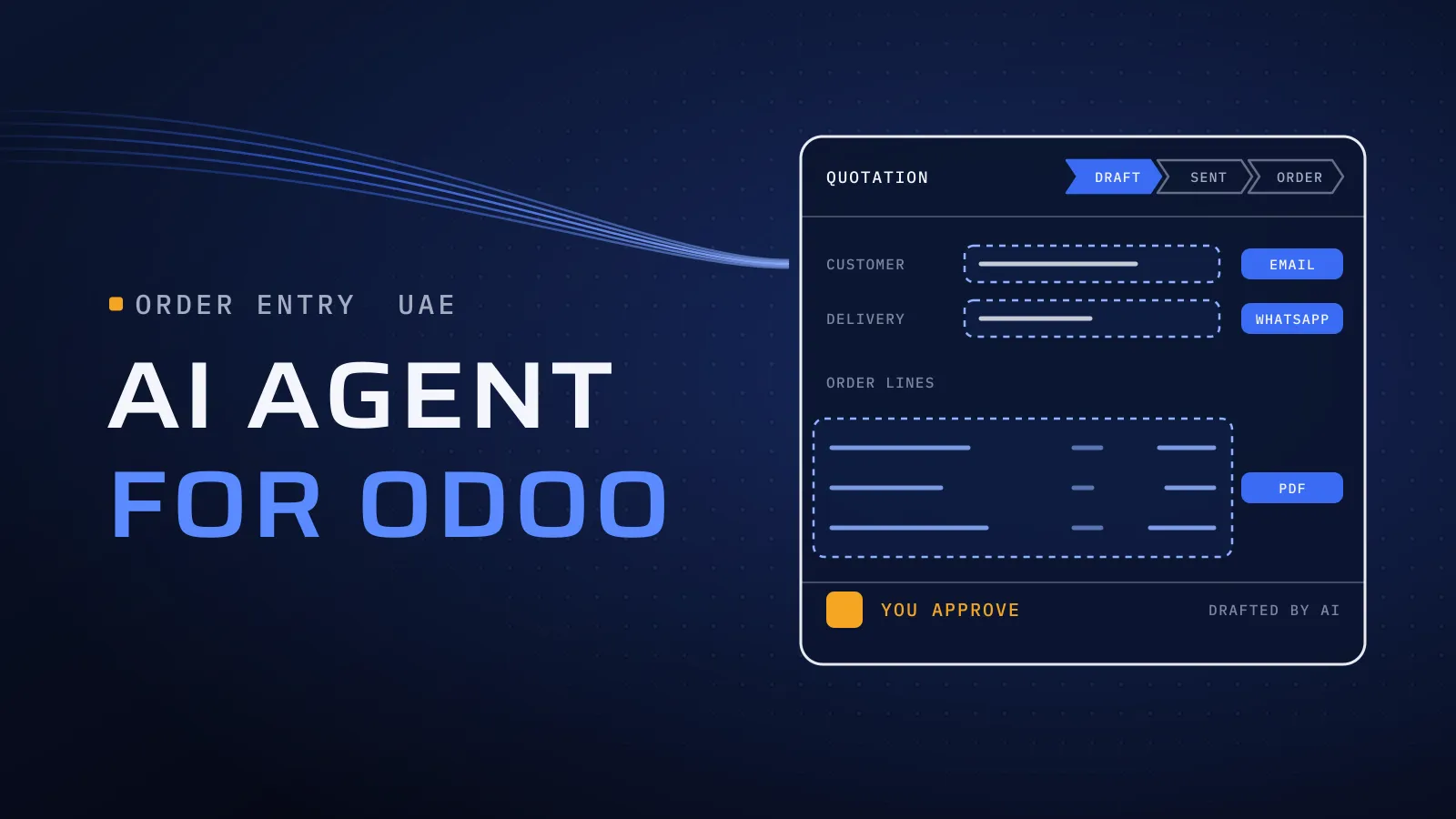
Your sales coordinators start each day retyping orders: a purchase order PDF from a customer’s system, an email listing six item codes, a WhatsApp message in Gulf Arabic asking for “the same as last week”. An AI agent for Odoo reads those orders, finds the customer, products and prices already in your Odoo, and leaves a draft quotation for your team to confirm, so orders go in faster and nothing leaves without a person.
What can an AI agent for Odoo do?
Quick answer: It reads orders that arrive outside Odoo, by email, PDF or WhatsApp, in Arabic or English. It matches the customer, products and prices to your Odoo records and creates a draft quotation with the original order attached. A person confirms it. Anything it can’t match goes to a review queue instead of being guessed.
Have one order channel in mind? Find your first Odoo task for an AI agent →
What retyping orders costs you
Every order typed by hand waits for someone to type it. A customer’s item code keyed as one of yours, a price copied from an old PDF instead of the pricelist, an email left unread over the weekend: each one comes back as a wrong delivery, a credit note or an unhappy buyer. Orders taken on WhatsApp live in one salesperson’s phone until someone enters them. And the people who know your customers well spend their mornings copying.
Where orders come from, and what the agent drafts
Start with the channel that brings the most orders and the fewest surprises. Mark your starting row with your sales or customer-service lead.
| Order arrives as | What the agent drafts in Odoo | What stays with a person | Good first task? |
|---|---|---|---|
| An email with the order in the text | A draft quotation, with the email logged on it | Confirming and sending | Yes, usually the easiest start |
| A PDF purchase order from a customer’s system | A draft quotation with the customer’s PO number and dates | Lines whose price differs from your pricelist | Yes, if a few customers send most of the POs |
| A scan or phone photo of a handwritten order | A draft, once reading is tested on your samples | Every line below the confidence threshold | Later |
| A WhatsApp text in Arabic, English or both | A draft quotation linked to the chat | Replies to the customer | Yes, if WhatsApp is your main order channel |
| A WhatsApp voice note | A written transcript, then a draft | The whole order, until dialect testing passes | Later |
| “Same as last time, plus three cartons” | A copy of the customer’s last order, with the change applied | Checking the change | Yes, once customer matching is reliable |
| A change to a confirmed order | A note and a task for the order’s owner | The change itself | No: changes stay with people |
| A new customer with no record in Odoo | A draft contact, flagged | Credit terms, trade licence and TRN | No: the agent drafts, finance approves |
How to read it: the agent drafts. It never confirms an order, changes a price or messages a customer on its own. Supplier invoices are a separate job: they become draft vendor bills for your accounts team, not quotations.
How the agent works inside Odoo: draft, check, approve
The general rules for any agent, from a named owner to a trial run beside your team, are in our guide to AI agents for enterprises. Inside Odoo, they come down to five settings:
- Its own Odoo user, with sales rights only. It signs in as itself, so every record it touches carries its name. It creates quotations and draft contacts. It can’t confirm orders, edit pricelists or post invoices, and a rule in Odoo blocks confirmation as a second lock.
- Prices and tax from Odoo, not from the order. Prices come from the customer’s pricelist, and VAT from the fiscal position and the product’s taxes. A PO price that differs is flagged, not copied.
- Matching that knows your customers’ words. Customers order by their own codes, your old codes or product names in Arabic or English. The agent maps each customer’s codes to your products, and every correction your team makes is added to the map.
- The original on every draft. The email, PDF or chat is logged on the quotation, so the person approving sees both side by side.
- A review queue, not a guess. An unknown product, a new delivery address, an order above your limit or a customer over their credit limit becomes an Odoo activity for a named person.
Odoo’s own AI needs the same care. Its documentation for AI server actions says a tool the AI picks “will execute unconditionally, unless the code itself prevents it”, so business rules must be written into each tool. Whichever route you take, draft-then-approve has to be built in.
WhatsApp orders into Odoo
Many UAE customers order on WhatsApp. Check three things first:
- The account. Odoo’s WhatsApp app is part of Odoo Enterprise and needs a WhatsApp Business Platform account. A number on the WhatsApp Business app on someone’s phone doesn’t connect as it is.
- Where messages land. In Odoo’s Discuss. The agent reads the chat, drafts the quotation and links the two. A person replies.
- The language. WhatsApp orders are short, informal and often in dialect: نفس طلبية الأسبوع اللي طاف، بس زيد ٣ كراتين ماي (“same as last week’s order, but add 3 cartons of water”). That one line holds a customer match, a past order, a quantity in Arabic-Indic digits and a product named in Gulf dialect. Test the agent on a few hundred of your real messages before it drafts anything live.
Our core team are native Arabic speakers, so the people checking those drafts read them the way your sales team does. No WhatsApp orders today? Start with the inbox.
Odoo’s own AI, an Apps Store module or a custom agent?
Check your plan first. On Odoo’s pricing page, checked on 27 October 2026, the Custom plan lists “Agentic AI” and External API, which outside software needs to read and write Odoo data. The Standard plan lists neither, so on Standard, every route starts with a move to Custom.
| Odoo’s own AI (Odoo 20) | A module from the Odoo Apps Store | A custom agent | |
|---|---|---|---|
| Fits when | The work starts and ends inside Odoo, such as live chat leads or filling in a field | One standard job on a supported version, such as a chat over your records | Orders arrive by email, PDF or WhatsApp, in Arabic, and must pass your own checks |
| Plan | Custom plan; usage draws Odoo’s in-app credits | Check each listing’s versions and hosting | External API: the Custom plan on Odoo Enterprise, or Odoo Community |
| Drafts before anything changes | Only where each tool is coded to stop | Check the listing; some edit records directly | Drafts only, by design |
| Arabic and dialect | Test it on your messages | Rarely documented | Tested on your messages before go-live |
| Cost | Plan and credits | A licence plus setup | A build agreed in your proposal, plus AI usage |
| Watch for | Business rules written into every tool | A version of the module for your next Odoo upgrade | Build cost against a low order volume |
What this means for you: on Standard, weigh the move to Custom against the hours your team spends retyping. Already on Custom? Test Odoo’s own AI first on jobs that stay inside Odoo. If it does the job, we’ll say so.
An agent or an AI Knowledge Assistant?
They are often confused, and they solve different problems:
- An AI agent acts. It reads an order and drafts a record in Odoo for a person to approve.
- Our AI Knowledge Assistant answers. Staff ask in Arabic or English, and it replies from your documents, such as product specifications or warranty terms, showing the source. It changes nothing in Odoo.
A sales team often needs both: the assistant answers “which grade meets this spec?”, and the agent drafts the order once the customer decides. If unanswered questions are the bigger problem, start with our guide to the Arabic AI chatbot for company documents.
Tell us how orders reach you today: the channels, roughly how many orders arrive on a normal day, and your Odoo version and plan. A few sample orders help, and we sign an NDA first if you want one. We reply with the channel we would start with, what the agent could draft and which cases should stay with your team.
Find your first Odoo task for an AI agent →
Not ready for a call? Ask for our company profile and we’ll send it to you.
What we bring to an Odoo agent
We provide Odoo implementation in the UAE, so the agent is planned by people who know where quotations, pricelists, fiscal positions and access rights live in Odoo, and what an upgrade does to anything custom. We have also built AI chatbots and assistants that answer from company documents; those clients are under NDA, so we don’t name them. Both follow one rule: AI drafts, a person decides.
Quality is built into every step. CTO oversight covers how the agent connects to your Odoo. Independent QA tests it on your Arabic, English and mixed orders before it drafts anything live. And the work runs on a dated plan in FloPlan, our own delivery software. Our AI agent development in Dubai covers the rest of our AI work.
Bring a week of orders
Since 2014 we have built software for more than 100 clients across the UAE, Saudi Arabia, Qatar, Kuwait, the USA and Canada, from our headquarters at Dubai Digital Park in Dubai Silicon Oasis. Our Odoo work is for companies in the UAE. Your price is agreed in your proposal, and it follows the channels, the order formats, how your products are coded and how many cases need a person.
Find your first Odoo task for an AI agent → We ask about your goal, what you use today, your timing and who else should be involved. You leave with clear next steps. The call commits you to nothing, and we sign an NDA first if you want one.
Frequently asked questions
Does Odoo have its own AI agents?
Yes. Odoo 20's AI app has agents that can create and update records, AI fields, AI server actions and an agent for website live chat. On Odoo's pricing page, checked on 27 October 2026, agentic AI sits in the Custom plan, and AI usage draws Odoo's in-app purchase credits. It suits work that starts and ends inside Odoo. Orders that arrive by email, PDF or WhatsApp usually need a custom agent.
What does an AI agent for Odoo cost?
There are two parts. The build covers connecting the order channels, the matching rules, the review queue and testing on your own orders. The running cost is AI usage, billed by volume, plus your team's review time, and the Odoo Custom plan if you aren't on it already. Our price is agreed in your proposal once we have seen your orders, and cost per order is tracked from the trial.
Will the agent confirm orders or message customers by itself?
No. It works through its own Odoo user, which creates draft quotations and draft contacts only. Confirming orders, changing prices and messaging customers stay with your team. Once its drafts have been right for long enough, it can also draft WhatsApp replies, and a person still sends them.
Can it read orders in Arabic and Gulf dialect?
Yes, once it passes a test built from your own messages: Gulf dialect, Arabic and English in one line, Arabic-Indic digits and the product names your customers actually use. Lines it can't match go to a person instead of being guessed. Voice notes come later, after their transcripts pass the same test.
What happens to the agent when we upgrade Odoo?
A custom agent works through Odoo's external API rather than living inside your database, so an upgrade means retesting it on the new version, with small changes where Odoo renamed something. Put it in the upgrade's test plan, next to your custom modules, and it moves with the rest of your system.
What if it doesn't save enough time?
The trial answers that before any draft reaches live work. If minutes per order, including review, don't beat your baseline, you stop there with your order flow mapped and measured, and we tell you whether plain Odoo rules would do the job. You never commit to a full roll-out on a guess.