Odoo Community to Enterprise Migration in the UAE: What Changes, What Moves and When to Stay
Odoo Community to Enterprise migration in the UAE: Enterprise-only apps, licences, hosting, custom modules, data, testing and when to stay on Community.
An Odoo Community to Enterprise migration in the UAE usually starts with a gap: the VAT return rebuilt in a spreadsheet, WPS payroll run outside Odoo, or a version upgrade nobody wants to do by hand. Switching closes those gaps on the same database. It also changes your licences, may change your hosting, and asks every custom module whether it is still needed. Plan those three and your history stays put; skip them and the switch stalls on a module nobody can explain.
Still choosing an edition for a first rollout? Our Odoo implementation guide covers that choice. This guide is for databases already running Community.
What does an Odoo Community to Enterprise migration involve?
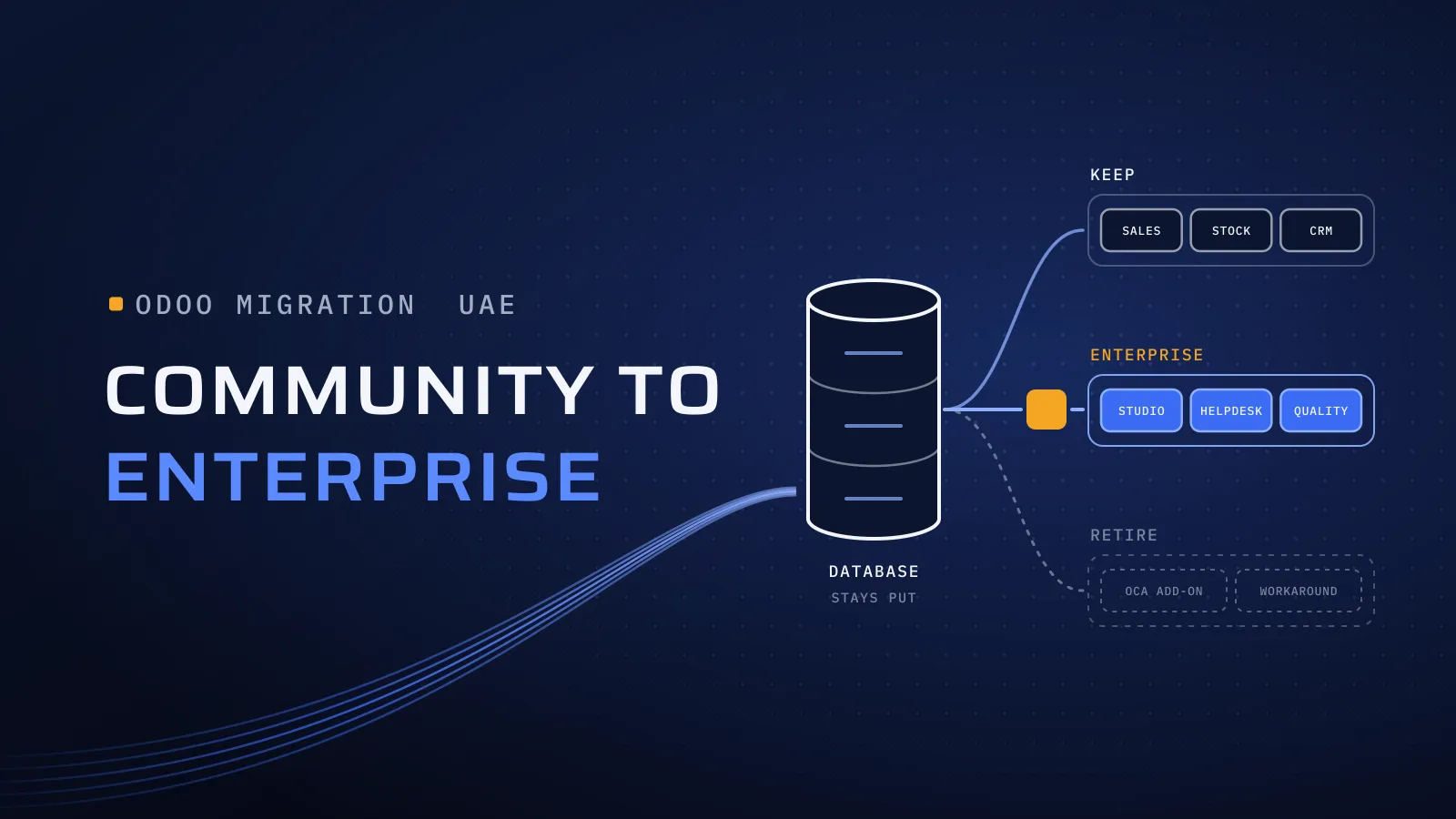
Quick answer: On your own server, Enterprise is installed over Community on the same database and activated with a subscription code, so your standard data stays. The work is around it: choosing the plan and hosting, reviewing each custom module and Community add-on, moving data out of add-ons you retire, and testing on a copy before you switch.
Running Community today? Send us your module list and we’ll say what the switch touches.
What staying on Community costs you
In the UAE, Community leaves two regular jobs outside Odoo: the VAT201 and Corporate Tax reports, and WPS payroll. Each is a spreadsheet someone rebuilds, every quarter or every month. Version upgrades are the third cost. Odoo’s upgrade service asks for an Enterprise subscription code, so on Community each upgrade is your own project, and Odoo 17’s standard support ended in September 2026.
What changes, and what stays the same
Take this table to your finance and IT leads. The Enterprise-only apps are the ones missing from Odoo’s public Community source code for versions 19 and 20, as we checked on 27 October 2026.
| Area | On Community | After switching to Enterprise |
|---|---|---|
| Your records and history | In your database | The same database; nothing is re-entered |
| UAE taxes, chart of accounts, bilingual tax invoices | Yes | Yes |
| Accounting | Invoicing: invoices, bills and payments | Full Accounting: bank reconciliation, assets, follow-ups and financial reports |
| VAT201 and Corporate Tax reports | Not available | Odoo’s UAE accounting reports |
| Payroll and WPS | Not available | Odoo Payroll with the UAE localisation: WPS file, gratuity and leave provisions |
| Studio | Not available | On the Custom plan |
| Other Enterprise-only apps | Not available | Documents, Sign, Helpdesk, Planning, Field Service, Barcode, Quality, PLM, Knowledge, Appointments, Subscriptions, Rental, Approvals and Appraisals |
| CRM, Sales, Purchase, Inventory, Manufacturing, Point of Sale, Website, Time Off, Expenses | Yes | Yes, in the Enterprise interface |
| Version upgrades | Your own project | Odoo’s upgrade service for the standard apps and Studio changes |
| Help | Forums and your implementer | Odoo’s support for the standard apps, plus your implementer for custom work |
| Licence | Free | Per user who logs in |
Our Odoo VAT guide and Odoo payroll guide show what the two UAE rows need set up after the switch.
Licences: which plan, and who counts
Odoo sells two paid plans:
- Standard runs on Odoo Online only, which can’t run custom or Apps Store modules.
- Custom adds Studio, several companies and the external API, and is the only plan that runs on Odoo.sh or your own server. If you keep any custom module, this is your plan.
On 20 October 2026, odoo.com showed UAE visitors US$13.50 per user per month for Standard and US$25.50 for Custom, billed yearly, for the first 12 months; after that, US$16.90 and US$32.00. Count every user who logs in. Portal users, such as customers viewing invoices, are free. If you add Payroll, employees who never log in still count, as lower-priced light users. Work out your figures in the Odoo licence calculator.
Hosting: your own server, Odoo.sh or Odoo Online
We don’t sell hosting, so read this as a neutral map. Community runs on a server you control; Enterprise can stay there or move.
| Hosting | Plan | What the move needs |
|---|---|---|
| Your own server | Custom | The switch in place: Enterprise installed over Community, then your subscription code entered, as Odoo’s Community to Enterprise steps describe |
| Odoo.sh | Custom | A supported version (18, 19 or 20 today), your custom modules in a GitHub branch, and the database imported as a backup with its files |
| Odoo Online | Standard or Custom | A supported version, every non-standard app uninstalled on a copy first, and a support ticket to Odoo, which checks the database before putting it online, as its hosting guide sets out |
The Odoo Online row hides a data question. Uninstalling an app removes the data it holds, so anything kept only in a Community add-on has to move into standard records, or be exported, before that copy is made.
Want to know what the switch touches in your database? Send us your Odoo version, where it runs, how many people log in and a screenshot of the Apps menu. We reply with which add-ons an Enterprise app replaces, the plan and hosting that fit, and what to test on the copy. Plan your move to Odoo Enterprise →
Not ready for a call? Ask for our company profile and we’ll send it to you.
Custom modules and Community add-ons: three questions each
- Does an Enterprise app now do this job? Community add-ons for accounting reports, payroll, assets or barcode scanning often duplicate Enterprise apps. Retire them, after moving their data.
- Does it still work beside Enterprise? Enterprise changes the interface and extends the standard apps, so modules that change screens or printed documents need retesting, and two modules doing the same job can clash.
- Is anyone still using it? Every module you drop is one less to test now, and one less to port at every upgrade.
Integrations get the same treatment: bank feeds, payment gateways, your online store and marketplace links are retested on the copy against sandbox accounts. We have connected Odoo to Noon and Amazon; links like those belong on the test list too.
Data: what moves by itself, and what needs a plan
- Moves by itself: everything in the standard apps. Contacts, products, orders, invoices, journal entries and stock stay in the same database.
- Data in add-ons you retire: payslip history, leave balances, asset registers and follow-up levels. Enterprise apps don’t read another module’s tables, so you load opening balances into them and keep the history as an export.
- Payroll’s starting point: contracts with the basic wage separate from allowances, each employee’s joining date for gratuity, and opening leave balances.
- Corporate Tax tags: none are set by default, so tag the accounts before the first report.
How the switch runs, step by step
- List everything installed: version, hosting, apps, every custom and Apps Store module, integrations, printed documents and the users who log in. Decide what to retire.
- Choose the plan and hosting from the tables above, and buy the subscription for the users you counted.
- Rehearse on a copy, with outgoing email and scheduled actions off: switch, move data out of retired add-ons, and set up the new apps.
- Test with key users: last quarter’s VAT201 against your filed return, one payroll run against last month’s, each custom module, each printed document and each integration.
- Switch at a quiet time, ideally the start of a month or VAT period, after a full rehearsal. Then file the first VAT return and run the first payroll from Odoo.
If your Community database runs on 16 or 17, the version upgrade belongs to the same project; our Odoo upgrade guide covers that side.
When to stay on Community
- Your accountant prepares VAT returns outside Odoo, and that works.
- Payroll runs with a provider or a system you are happy with.
- The apps you use are in Community: CRM, Sales, Purchase, Inventory, Manufacturing, Point of Sale, Website.
- Developers you employ maintain your modules and do your upgrades.
- Your Community add-ons do their job, and someone owns each one.
If most of these describe you, stay on Community. Ask us and we’ll tell you the same.
Who runs your switch
We implement Odoo for UAE businesses from Dubai Digital Park, and we support any Odoo in the UAE, including Community systems another company set up. We have upgraded Odoo versions, and we have connected Odoo to Noon and Amazon. Our Odoo team leads the switch, and quality is built into every step: CTO oversight on which modules stay, retire or move, independent QA on the rehearsal, and a dated plan in FloPlan, the delivery software we built and use ourselves.
Outside Odoo, we build ERP software from scratch. Al-Mawared ERP is a web-based ERP we built for exchange companies across the MENA region. Talk to the team that built it: book a meeting.
Bring your module list
Tell us your Odoo version, where it runs, how many people log in and which modules are installed. The switch, the setup of your new apps and support afterwards are part of our Odoo implementation services in the UAE. If Community still fits, we’ll say so.
Plan your move to Odoo Enterprise → We ask about your goal, what you use today, your timing and who else should be involved. You leave with clear next steps. We reply by email first and set up a call only if you want one. Asking commits you to nothing, and we sign an NDA first if you ask.
Odoo’s Community to Enterprise, hosting and upgrade documentation, Odoo’s upgrade request form and Odoo’s Community source code for versions 19 and 20 checked on 27 October 2026. Licence prices from our Odoo cost guide, viewed on odoo.com from the UAE on 20 October 2026.
Frequently asked questions
Do we lose data when we switch from Community to Enterprise?
Not in the standard apps. On your own server, Enterprise is installed on the same database, so contacts, products, invoices, stock and journal entries stay where they are. Data held in Community add-ons you retire is different: uninstalling a module removes its data, so move or export it first.
Is switching to Enterprise the same as an Odoo upgrade?
No. Odoo's upgrade documentation lists switching editions as something an upgrade doesn't cover. On your own server you switch on the version you run. Odoo Online and Odoo.sh accept only supported versions, so a database on 16 or 17 needs an upgrade too; plan both together so your team tests once.
Which Odoo plan do we need after switching?
Standard runs on Odoo Online only, which can't run custom or Apps Store modules. If you keep custom modules or your own server, you need the Custom plan, which also adds Studio, several companies and the external API. Count every user who logs in; portal users are free.
Do we need Odoo Enterprise for UAE VAT returns?
For Odoo's VAT201 and Corporate Tax reports, yes: they are Enterprise apps. Community has the UAE taxes, the chart of accounts and bilingual tax invoices. Some Community users export to their accountant instead, which works as long as someone owns that step every quarter.
Can you support a Community system another company set up?
Yes. We support any Odoo in the UAE, including systems another company set up. We start by listing what is installed and what each custom module does, so the choice to switch or stay rests on facts about your database.
What does the switch cost?
Two bills. The licences are Odoo's published per-user prices, which our licence calculator works out for your users. The work grows with your custom modules, the add-ons you retire, the data to move, your integrations and the testing your team needs. Ours is agreed in your proposal.